<?xml version="1.0" encoding="utf-8"?>
<feed xmlns="http://www.w3.org/2005/Atom">

  <title><![CDATA[The inception and journey of ideas]]></title>
  <link href="http://www.procmind.com/atom.xml" rel="self"/>
  <link href="http://www.procmind.com/"/>
  <updated>2016-02-01T10:36:37+00:00</updated>
  <id>http://www.procmind.com/</id>
  <author>
    <name><![CDATA[procmind]]></name>
    
  </author>
  <generator uri="http://octopress.org/">Octopress</generator>

  
  <entry>
    <title type="html"><![CDATA[SmartOS as a Virtualisation Platform]]></title>
    <link href="http://www.procmind.com/blog/2016/01/31/smartos-as-a-virtualisation-platform/"/>
    <updated>2016-01-31T13:57:20+00:00</updated>
    <id>http://www.procmind.com/blog/2016/01/31/smartos-as-a-virtualisation-platform</id>
    <content type="html"><![CDATA[<p>Virtualisation platforms and technologies represent a big focal point of the technology scene these days.</p>

<p>Recently I&rsquo;ve watched a dockercon 2015 presentation by Bryan Cantrill, CTO of Joyent, an OS kernel developer for 20 years and father of Dtrace as he calls himself [1],  about how to debug docker containers gone bad in production. [2]</p>

<p>I recommend to anyone working or thinking of working with linux containers and docker especially to watch this presentation !</p>

<p>I have to say that this is one of the best presentations I&rsquo;ve seen when it comes to showing the full picture of the docker tooling, lifecycle and ecosystem.</p>

<!-- more -->


<p>In his presentation, Bryan brings the operational point of view of running applications, in docker, in a production environment and how to deal with and debug failure when applications inside docker containers go wrong.</p>

<p>It is very rare to see a good presentation on the failure modes of docker since most presentation and talks focus on why docker is amazing and it will solve all your problems.</p>

<p>Irrespective of using docker or not, applications have bugs, they go wrong, it is very important to have adequate tooling and discipline to debug and improve them.</p>

<p>Towards the end of his talk Bryan shows some amazing tools and services that the Joyent team has built since 2004 when they&rsquo;ve started their journey as a &ldquo;cloud platform&rdquo; company.</p>

<p>All these tools are built upon their platform hypervisor called SmartOS. [3]</p>

<p>The presentation plus the details I&rsquo;ve read about SmartOS intrigued me, and I gave SmartOS a spin in a KVM virtual machine to see what it can do.</p>

<h1>What is SmartOS</h1>

<p>Disclaimer: I&rsquo;m no authority on SmartOS, I&rsquo;m relaying to you what I&rsquo;ve found out about it until now.</p>

<p>Go and search for yourself to find out more.</p>

<hr />

<p>Historically speaking SmartOS derives from the Solaris OS. [4]</p>

<p>A fork of Solaris, called OpenSolaris, was created in 2004.</p>

<p>After the Oracle aquisition of SUN Microsystems in 2010, a group of Solaris engineers created the illumos kernel [5] which was used subsequently to power OpenIndiana from which SmartOS sprang.</p>

<p>The Solaris kernel developers have started working on OS virtualisation since 2005, it looks like they are 10 years or so ahead of the Linux containers and it shows. [6]</p>

<hr />

<p>SmartOS is not a general purpose OS, it appears to be designed from the ground up to run virtual workloads.</p>

<p>It is effectively a Read-Only (almost full RO) platform hypervisor running in RAM and managing different kinds of virtual workloads.</p>

<p>SmartOS can run these <strong>virtual workloads</strong> at the same time using the same tooling:</p>

<ul>
<li>fully emulated virtual hardware VMs, achieved by using the KVM hypervisor</li>
<li>3 types of OS virtualisation, sharing one OS kernel between multiple partitioned zones ( called containers in Linux land ):

<ul>
<li>it can run SmartOS zones, called <strong>joyent brand</strong> zones</li>
<li>it can run Linux zones, called <strong>lx brand</strong> zones. This allows a user to run a full Linux userland on the SmartOS UNIX kernel</li>
<li>docker containers from the docker hub, still called <strong>lx brand</strong> zones and running on the same SmartOS UNIX kernel</li>
</ul>
</li>
</ul>


<p>Because SmartOS is built on the powerfull legacy of Solaris zones, it has a very useful and powerfull feature compared to Linux containers: complete zone isolation !</p>

<p>From a security point of view SmartOS zones ( read containers ) are fully isolated, an attacker that has been able to gain root privileges in the zone cannot gain root access on the host hypervisor. [11]</p>

<p>I&rsquo;ve heard that this is why the Joyent cloud runs containers on bare-metal, while other cloud providers like AWS or Google run containers in VMs.</p>

<h2>Ramdisk is where SmartOS feels at home</h2>

<p>General purpose OSes have to be installed on disk to function.</p>

<p>SmartOS on the other hand boots of and ISO or USB stick or PXE booted and it runs entirely in RAM. It has no installation to disk option.</p>

<p>Here are some arguments about why booting from RAM is a feature in SmartOS. [7]</p>

<p>The SmartOS hypervisor/OS, or what is called the <strong>global zone</strong>, [10] is mostly Read-Only.</p>

<p>I&rsquo;ve seen recently in the Linux world this kind of approach by the people behind CoreOS. Surely they can draw more inspiration from the SmartOS/OpenSolaris developers.</p>

<h1>How can anyone test it ?</h1>

<p>I&rsquo;ve tested it by using the SmartOS iso and booting it in a KVM VM.</p>

<p>I could have achieved the same thing by booting of the SmartOS USB drive.</p>

<p>If you have a type of virtualisation on your laptop/desktop ( KVM, Virtualbox, VMware &hellip;) than you can give it a spin in a VM. [8]</p>

<h1>What can a user run on SmartOS ?</h1>

<p>A user can run KVM VMs and SmartOS OS virtualisation zones.</p>

<p>Since I&rsquo;m running SmartOS in KVM, even if I have enabled KVM passthrough on my desktop, I haven&rsquo;t tried to run KVM VMs because the boot sequence of SmartOS says that KVM is not supported on my VM, therefore I&rsquo;ve only been able to run zones.</p>

<h2>SmartOS hypervisor</h2>

<p>After booting from the iso image or the USB image, you&rsquo;ll follow a few basic questions to setup networking and the ZFS pools in the global zone.</p>

<figure class='code'><figcaption><span>SmartOS global zone </span></figcaption>
<div class="highlight"><table><tr><td class="gutter"><pre class="line-numbers"><span class='line-number'>1</span>
<span class='line-number'>2</span>
<span class='line-number'>3</span>
<span class='line-number'>4</span>
<span class='line-number'>5</span>
<span class='line-number'>6</span>
<span class='line-number'>7</span>
<span class='line-number'>8</span>
<span class='line-number'>9</span>
<span class='line-number'>10</span>
<span class='line-number'>11</span>
<span class='line-number'>12</span>
<span class='line-number'>13</span>
</pre></td><td class='code'><pre><code class='bash'><span class='line'><span class="o">[</span>root@smartos ~<span class="o">]</span><span class="c"># ifconfig -a</span>
</span><span class='line'>lo0: <span class="nv">flags</span><span class="o">=</span>2001000849&lt;UP,LOOPBACK,RUNNING,MULTICAST,IPv4,VIRTUAL&gt; mtu <span class="m">8232</span> index 1
</span><span class='line'>        inet 127.0.0.1 netmask ff000000
</span><span class='line'>rtls0: <span class="nv">flags</span><span class="o">=</span>1004943&lt;UP,BROADCAST,RUNNING,PROMISC,MULTICAST,DHCP,IPv4&gt; mtu <span class="m">1500</span> index 2
</span><span class='line'>        inet 10.110.110.131 netmask ffffff00 broadcast 10.110.110.255
</span><span class='line'>        ether 52:54:0:33:ea:3a
</span><span class='line'>lo0: <span class="nv">flags</span><span class="o">=</span>2002000849&lt;UP,LOOPBACK,RUNNING,MULTICAST,IPv6,VIRTUAL&gt; mtu <span class="m">8252</span> index 1
</span><span class='line'>        inet6 ::1/128
</span><span class='line'><span class="o">[</span>root@smartos ~<span class="o">]</span><span class="c">#  </span>
</span><span class='line'><span class="o">[</span>root@smartos ~<span class="o">]</span><span class="c"># uname -a</span>
</span><span class='line'>SunOS smartos 5.11 joyent_20160121T174331Z i86pc i386 i86pc
</span><span class='line'><span class="o">[</span>root@smartos ~<span class="o">]</span><span class="c"># zonename</span>
</span><span class='line'>global
</span></code></pre></td></tr></table></div></figure>


<p>Once that is done you&rsquo;re all setup to start running virtual workloads.</p>

<p>Another very useful feature of SmartOS is that SmartOS treats all 4 types of virtualisation described above as the same thing:</p>

<ul>
<li>a disk image of some type</li>
<li>a bit of json metadata</li>
<li>a virtualisation wrapper( KVM, zones) that starts using that disk image and the json metadata</li>
</ul>


<p>All 4 types of virtualisation are created, lifecycle managed, and destroyed using the exact same tools:</p>

<ul>
<li>disk image manager <code>imgadm</code></li>
<li>virtual machine manager <code>vmadm</code></li>
</ul>


<p>That is it!</p>

<p>No more running <code>docker ...</code> or <code>rkt ..</code> for a container workload, then <code>qemu-system-x86_64</code> or interfacing with libvirt for KVM VM, each coming with its own tool for creating, lifecycle managing and destroying the virtual workloads.</p>

<p>Disclaimer: all zones that I&rsquo;ll show you how to start are started using the &ldquo;admin&rdquo; networking, which basically means they&rsquo;ll all be in bridged network mode and you&rsquo;ll be able to access them on your internal network as if they were other separate physical hardware.</p>

<h2>SmartOS zone</h2>

<p>Lets run another instance of SmartOS, as an isolated zone, lets say for SmartOS package building !</p>

<ul>
<li>find some SmartOS disk images provided by Joyent:</li>
</ul>


<figure class='code'><figcaption><span>find SmartOS datasets </span></figcaption>
<div class="highlight"><table><tr><td class="gutter"><pre class="line-numbers"><span class='line-number'>1</span>
<span class='line-number'>2</span>
<span class='line-number'>3</span>
<span class='line-number'>4</span>
<span class='line-number'>5</span>
<span class='line-number'>6</span>
<span class='line-number'>7</span>
<span class='line-number'>8</span>
<span class='line-number'>9</span>
<span class='line-number'>10</span>
<span class='line-number'>11</span>
</pre></td><td class='code'><pre><code class='bash'><span class='line'>imgadm avail <span class="p">|</span>grep base <span class="p">|</span> tail -n10
</span><span class='line'>3c0e76fe-0563-11e5-a0d7-9fe1e24b554c  base-multiarch          15.1.1      smartos  zone-dataset  2015-05-28
</span><span class='line'>2bd52afe-3474-11e5-b07d-c7fb14b2c9e8  base-32                 15.2.0      smartos  zone-dataset  2015-07-27
</span><span class='line'>5c7d0d24-3475-11e5-8e67-27953a8b237e  base-64                 15.2.0      smartos  zone-dataset  2015-07-27
</span><span class='line'>9caff6c6-3476-11e5-9951-bf98c6cb8636  base-multiarch          15.2.0      smartos  zone-dataset  2015-07-27
</span><span class='line'>7bcfc9c8-6e9a-11e5-8d57-73e262d7338e  base-32                 15.3.0      smartos  zone-dataset  2015-10-09
</span><span class='line'>842e6fa6-6e9b-11e5-8402-1b490459e334  base-64                 15.3.0      smartos  zone-dataset  2015-10-09
</span><span class='line'>9250f5a8-6e9c-11e5-9cdb-67fab8707bfd  base-multiarch          15.3.0      smartos  zone-dataset  2015-10-09
</span><span class='line'>543ef738-beb5-11e5-bf3d-675487324488  base-32-lts             15.4.0      smartos  zone-dataset  2016-01-19
</span><span class='line'>96bcddda-beb7-11e5-af20-a3fb54c8ae29  base-64-lts             15.4.0      smartos  zone-dataset  2016-01-19
</span><span class='line'>f58ce4f2-beb9-11e5-bb02-e30246d71d58  base-multiarch-lts      15.4.0      smartos  zone-dataset  2016-01-19
</span></code></pre></td></tr></table></div></figure>


<ul>
<li>download the zfs volume into your local pool</li>
</ul>


<figure class='code'><figcaption><span></span></figcaption><div class="highlight"><table><tr><td class="gutter"><pre class="line-numbers"><span class='line-number'>1</span>
<span class='line-number'>2</span>
</pre></td><td class='code'><pre><code class='bash'><span class='line'>imgadm import 96bcddda-beb7-11e5-af20-a3fb54c8ae29
</span><span class='line'>...
</span></code></pre></td></tr></table></div></figure>


<ul>
<li>create a json description of the zone you&rsquo;d like to start</li>
</ul>


<figure class='code'><figcaption><span></span></figcaption><div class="highlight"><table><tr><td class="gutter"><pre class="line-numbers"><span class='line-number'>1</span>
<span class='line-number'>2</span>
<span class='line-number'>3</span>
<span class='line-number'>4</span>
<span class='line-number'>5</span>
<span class='line-number'>6</span>
<span class='line-number'>7</span>
<span class='line-number'>8</span>
<span class='line-number'>9</span>
<span class='line-number'>10</span>
<span class='line-number'>11</span>
<span class='line-number'>12</span>
<span class='line-number'>13</span>
<span class='line-number'>14</span>
<span class='line-number'>15</span>
<span class='line-number'>16</span>
<span class='line-number'>17</span>
</pre></td><td class='code'><pre><code class='bash'><span class='line'><span class="o">{</span>
</span><span class='line'> <span class="s2">&quot;brand&quot;</span>: <span class="s2">&quot;joyent&quot;</span>,
</span><span class='line'> <span class="s2">&quot;image_uuid&quot;</span>: <span class="s2">&quot;96bcddda-beb7-11e5-af20-a3fb54c8ae29&quot;</span>,
</span><span class='line'> <span class="s2">&quot;alias&quot;</span>: <span class="s2">&quot;smartosz01&quot;</span>,
</span><span class='line'> <span class="s2">&quot;hostname&quot;</span>: <span class="s2">&quot;smartosz01&quot;</span>,
</span><span class='line'> <span class="s2">&quot;max_physical_memory&quot;</span>: 512,
</span><span class='line'> <span class="s2">&quot;quota&quot;</span>: 10,
</span><span class='line'> <span class="s2">&quot;resolvers&quot;</span>: <span class="o">[</span><span class="s2">&quot;8.8.8.8&quot;</span>, <span class="s2">&quot;208.67.220.220&quot;</span><span class="o">]</span>,
</span><span class='line'> <span class="s2">&quot;nics&quot;</span>: <span class="o">[</span>
</span><span class='line'>  <span class="o">{</span>
</span><span class='line'>    <span class="s2">&quot;nic_tag&quot;</span>: <span class="s2">&quot;admin&quot;</span>,
</span><span class='line'>    <span class="s2">&quot;ip&quot;</span>: <span class="s2">&quot;10.110.110.142&quot;</span>,
</span><span class='line'>    <span class="s2">&quot;netmask&quot;</span>: <span class="s2">&quot;255.255.255.0&quot;</span>,
</span><span class='line'>    <span class="s2">&quot;gateway&quot;</span>: <span class="s2">&quot;10.110.110.1&quot;</span>
</span><span class='line'>  <span class="o">}</span>
</span><span class='line'> <span class="o">]</span>
</span><span class='line'><span class="o">}</span>
</span></code></pre></td></tr></table></div></figure>


<ul>
<li>start the SmartOS zone from the disk image downloaded and the json description</li>
</ul>


<figure class='code'><figcaption><span></span></figcaption><div class="highlight"><table><tr><td class="gutter"><pre class="line-numbers"><span class='line-number'>1</span>
<span class='line-number'>2</span>
</pre></td><td class='code'><pre><code class='bash'><span class='line'>vmadm create -f smartos-zone.json
</span><span class='line'>Successfully created VM 16021e9e-7e2f-4294-f7db-86dea02198be
</span></code></pre></td></tr></table></div></figure>


<ul>
<li>we can see the zone running by interogating the global zone stat tool ( equivalent to top )</li>
</ul>


<figure class='code'><figcaption><span></span></figcaption><div class="highlight"><table><tr><td class="gutter"><pre class="line-numbers"><span class='line-number'>1</span>
<span class='line-number'>2</span>
<span class='line-number'>3</span>
<span class='line-number'>4</span>
<span class='line-number'>5</span>
<span class='line-number'>6</span>
<span class='line-number'>7</span>
<span class='line-number'>8</span>
<span class='line-number'>9</span>
</pre></td><td class='code'><pre><code class='bash'><span class='line'>prstat -Z
</span><span class='line'>...
</span><span class='line'>  <span class="m">2933</span> root       23M   15M sleep    <span class="m">1</span>    <span class="m">0</span>   0:00:00 0.0% fmd/28
</span><span class='line'>  <span class="m">7582</span> root     6992K 1128K sleep   <span class="m">51</span>    <span class="m">0</span>   0:00:00 0.0% sshd/1
</span><span class='line'>   <span class="m">168</span> root     4516K 2752K sleep   <span class="m">29</span>    <span class="m">0</span>   0:00:00 0.0% devfsadm/8
</span><span class='line'>ZONEID    NPROC  SWAP   RSS MEMORY      TIME  CPU ZONE
</span><span class='line'>     <span class="m">6</span>       <span class="m">15</span>   55M   33M   0.8%   0:00:02 1.4% 16021e9e-7e2f-4294-f7db-86d*
</span><span class='line'>     <span class="m">0</span>       <span class="m">55</span>  322M  194M   4.7%   0:00:20 0.7% global
</span><span class='line'>     <span class="m">2</span>       <span class="m">10</span>  251M   31M   0.7%   0:00:00 0.0% eb5b5aad-54c6-6915-c1c8-9cc*
</span></code></pre></td></tr></table></div></figure>


<ul>
<li>either login in the zone from the SmartOS console via <code>zlogin</code> or simply ssh using the ip in the json description</li>
</ul>


<figure class='code'><figcaption><span></span></figcaption><div class="highlight"><table><tr><td class="gutter"><pre class="line-numbers"><span class='line-number'>1</span>
<span class='line-number'>2</span>
<span class='line-number'>3</span>
<span class='line-number'>4</span>
<span class='line-number'>5</span>
<span class='line-number'>6</span>
<span class='line-number'>7</span>
<span class='line-number'>8</span>
<span class='line-number'>9</span>
<span class='line-number'>10</span>
<span class='line-number'>11</span>
<span class='line-number'>12</span>
<span class='line-number'>13</span>
<span class='line-number'>14</span>
<span class='line-number'>15</span>
<span class='line-number'>16</span>
<span class='line-number'>17</span>
<span class='line-number'>18</span>
<span class='line-number'>19</span>
<span class='line-number'>20</span>
<span class='line-number'>21</span>
<span class='line-number'>22</span>
<span class='line-number'>23</span>
<span class='line-number'>24</span>
</pre></td><td class='code'><pre><code class='bash'><span class='line'>zlogin 16021e9e-7e2f-4294-f7db-86dea02198be
</span><span class='line'>...
</span><span class='line'><span class="o">[</span>Connected to zone <span class="s1">&#39;16021e9e-7e2f-4294-f7db-86dea02198be&#39;</span> pts/4<span class="o">]</span>
</span><span class='line'>   __        .                   .
</span><span class='line'> _<span class="p">|</span>  <span class="p">|</span>_      <span class="p">|</span> .-. .  . .-. :--. <span class="p">|</span>-
</span><span class='line'><span class="p">|</span>_    _<span class="p">|</span>     <span class="p">;|</span>   <span class="o">||</span>  <span class="p">|</span><span class="o">(</span>.-<span class="s1">&#39; |  | |</span>
</span><span class='line'><span class="s1">  |__|   `--&#39;</span>  <span class="sb">`</span>-<span class="s1">&#39; `;-| `-&#39;</span> <span class="s1">&#39;  &#39;</span> <span class="sb">`</span>-<span class="s1">&#39;</span>
</span><span class='line'><span class="s1">                   /  ; Instance (base-64-lts 15.4.0)</span>
</span><span class='line'><span class="s1">                   `-&#39;</span>  https://docs.joyent.com/images/smartos/base
</span><span class='line'>
</span><span class='line'><span class="o">[</span>root@smartosz01 ~<span class="o">]</span><span class="c"># zonename</span>
</span><span class='line'>16021e9e-7e2f-4294-f7db-86dea02198be
</span><span class='line'><span class="o">[</span>root@smartosz01 ~<span class="o">]</span><span class="c"># uname -a</span>
</span><span class='line'>SunOS smartosz01 5.11 joyent_20160121T174331Z i86pc i386 i86pc Solaris
</span><span class='line'><span class="o">[</span>root@smartosz01 ~<span class="o">]</span><span class="c">#</span>
</span><span class='line'><span class="o">[</span>root@smartosz01 ~<span class="o">]</span><span class="c"># psrinfo -v</span>
</span><span class='line'>Status of virtual processor <span class="m">0</span> as of: 01/31/2016 20:15:15
</span><span class='line'>  on-line since 01/31/2016 20:12:58.
</span><span class='line'>  The i386 processor operates at <span class="m">3600</span> MHz,
</span><span class='line'>        and has an i387 compatible floating point processor.
</span><span class='line'>Status of virtual processor <span class="m">1</span> as of: 01/31/2016 20:15:15
</span><span class='line'>  on-line since 01/31/2016 20:12:59.
</span><span class='line'>  The i386 processor operates at <span class="m">3600</span> MHz,
</span><span class='line'>        and has an i387 compatible floating point processor.
</span></code></pre></td></tr></table></div></figure>


<ul>
<li>install packages and start building</li>
</ul>


<h2>LX branded zone - full Linux userland</h2>

<p>This type of virtualisation resembles to OpenVZ or LXC virtualisation in Linux, a full OS operating system running in a &ldquo;container&rdquo;</p>

<p>This time we&rsquo;ll boot a full debian8 userland on the SmartOS kernel using the lx branded zone.</p>

<p>We&rsquo;ll follow the same steps and use the same tools to boot into the debian8 zone as we did for the SmartOS zone.</p>

<ul>
<li>find some debian disk images provided by Joyent:</li>
</ul>


<figure class='code'><figcaption><span></span></figcaption><div class="highlight"><table><tr><td class="gutter"><pre class="line-numbers"><span class='line-number'>1</span>
<span class='line-number'>2</span>
<span class='line-number'>3</span>
<span class='line-number'>4</span>
<span class='line-number'>5</span>
<span class='line-number'>6</span>
<span class='line-number'>7</span>
<span class='line-number'>8</span>
<span class='line-number'>9</span>
<span class='line-number'>10</span>
<span class='line-number'>11</span>
</pre></td><td class='code'><pre><code class='bash'><span class='line'>imgadm avail <span class="p">|</span>grep debian<span class="p">|</span>tail -n10
</span><span class='line'>a781a350-07f4-11e5-9372-5f2886027fbc  lx-debian-7             <span class="m">20150601</span>    linux    lx-dataset    2015-06-01
</span><span class='line'>1187b54a-15ca-11e5-a80c-275e2f64f91e  debian-7                <span class="m">20150618</span>    linux    lx-dataset    2015-06-18
</span><span class='line'>82d952c4-1b7b-11e5-a299-bb55cb08eab1  debian-7                <span class="m">20150625</span>    linux    lx-dataset    2015-06-25
</span><span class='line'>a00cef0e-1e73-11e5-b628-0f24cabf6a85  debian-7                <span class="m">20150629</span>    linux    lx-dataset    2015-06-29
</span><span class='line'>d8d81aee-20cf-11e5-8503-2bc101a1d577  debian-7                <span class="m">20150702</span>    linux    zvol          2015-07-02
</span><span class='line'>2f56d126-20d0-11e5-9e5b-5f3ef6688aba  debian-8                <span class="m">20150702</span>    linux    zvol          2015-07-02
</span><span class='line'>380539c4-3198-11e5-82c8-bf9eeee6a395  debian-7                <span class="m">20150724</span>    linux    lx-dataset    2015-07-24
</span><span class='line'>7c815c22-4606-11e5-8bb5-9f853c19be54  debian-7                <span class="m">20150819</span>    linux    lx-dataset    2015-08-19
</span><span class='line'>5fb104e4-6af5-11e5-a952-ff6eb14ca518  debian-7                <span class="m">20151005</span>    linux    lx-dataset    2015-10-05
</span><span class='line'>1adf7176-8679-11e5-9ff7-3beedf8060b9  debian-8                <span class="m">20151109</span>    linux    lx-dataset    2015-11-09
</span></code></pre></td></tr></table></div></figure>


<ul>
<li>download the <strong>lx-dataset</strong> zfs volume into your local pool, the <strong>zvol</strong> volume is for KVM VMs</li>
</ul>


<figure class='code'><figcaption><span></span></figcaption><div class="highlight"><table><tr><td class="gutter"><pre class="line-numbers"><span class='line-number'>1</span>
<span class='line-number'>2</span>
</pre></td><td class='code'><pre><code class='bash'><span class='line'>imgadm import 1adf7176-8679-11e5-9ff7-3beedf8060b9
</span><span class='line'>....
</span></code></pre></td></tr></table></div></figure>


<ul>
<li>get the kernel_version from the zfs volume metadata</li>
</ul>


<figure class='code'><figcaption><span></span></figcaption><div class="highlight"><table><tr><td class="gutter"><pre class="line-numbers"><span class='line-number'>1</span>
<span class='line-number'>2</span>
</pre></td><td class='code'><pre><code class='bash'><span class='line'>imgadm show 1adf7176-8679-11e5-9ff7-3beedf8060b9 <span class="p">|</span>grep kern
</span><span class='line'>    <span class="s2">&quot;kernel_version&quot;</span>: <span class="s2">&quot;3.16.0&quot;</span>
</span></code></pre></td></tr></table></div></figure>


<ul>
<li>create a json description of the zone you&rsquo;d like to start</li>
</ul>


<figure class='code'><figcaption><span></span></figcaption><div class="highlight"><table><tr><td class="gutter"><pre class="line-numbers"><span class='line-number'>1</span>
<span class='line-number'>2</span>
<span class='line-number'>3</span>
<span class='line-number'>4</span>
<span class='line-number'>5</span>
<span class='line-number'>6</span>
<span class='line-number'>7</span>
<span class='line-number'>8</span>
<span class='line-number'>9</span>
<span class='line-number'>10</span>
<span class='line-number'>11</span>
<span class='line-number'>12</span>
<span class='line-number'>13</span>
<span class='line-number'>14</span>
<span class='line-number'>15</span>
<span class='line-number'>16</span>
<span class='line-number'>17</span>
<span class='line-number'>18</span>
</pre></td><td class='code'><pre><code class='bash'><span class='line'><span class="o">{</span>
</span><span class='line'> <span class="s2">&quot;brand&quot;</span>: <span class="s2">&quot;lx&quot;</span>,
</span><span class='line'> <span class="s2">&quot;image_uuid&quot;</span>: <span class="s2">&quot;1adf7176-8679-11e5-9ff7-3beedf8060b9&quot;</span>,
</span><span class='line'> <span class="s2">&quot;alias&quot;</span>: <span class="s2">&quot;debianz01&quot;</span>,
</span><span class='line'> <span class="s2">&quot;hostname&quot;</span>: <span class="s2">&quot;debianz01&quot;</span>,
</span><span class='line'> <span class="s2">&quot;kernel_version&quot;</span>: <span class="s2">&quot;3.16.0&quot;</span>,
</span><span class='line'> <span class="s2">&quot;max_physical_memory&quot;</span>: 512,
</span><span class='line'> <span class="s2">&quot;quota&quot;</span>: 10,
</span><span class='line'> <span class="s2">&quot;resolvers&quot;</span>: <span class="o">[</span><span class="s2">&quot;8.8.8.8&quot;</span>, <span class="s2">&quot;208.67.220.220&quot;</span><span class="o">]</span>,
</span><span class='line'> <span class="s2">&quot;nics&quot;</span>: <span class="o">[</span>
</span><span class='line'>  <span class="o">{</span>
</span><span class='line'>    <span class="s2">&quot;nic_tag&quot;</span>: <span class="s2">&quot;admin&quot;</span>,
</span><span class='line'>    <span class="s2">&quot;ip&quot;</span>: <span class="s2">&quot;10.110.110.145&quot;</span>,
</span><span class='line'>    <span class="s2">&quot;netmask&quot;</span>: <span class="s2">&quot;255.255.255.0&quot;</span>,
</span><span class='line'>    <span class="s2">&quot;gateway&quot;</span>: <span class="s2">&quot;10.110.110.1&quot;</span>
</span><span class='line'>  <span class="o">}</span>
</span><span class='line'> <span class="o">]</span>
</span><span class='line'><span class="o">}</span>
</span></code></pre></td></tr></table></div></figure>


<ul>
<li>start the debian zone from the disk image downloaded and the json description</li>
</ul>


<figure class='code'><figcaption><span></span></figcaption><div class="highlight"><table><tr><td class="gutter"><pre class="line-numbers"><span class='line-number'>1</span>
<span class='line-number'>2</span>
</pre></td><td class='code'><pre><code class='bash'><span class='line'>vmadm create &lt; /root/zones-specs/debian-lx-zone.json
</span><span class='line'>Successfully created VM 28bef743-dc95-c0c9-ed90-9c0bcf31bef8
</span></code></pre></td></tr></table></div></figure>


<ul>
<li>either login in the zone from the SmartOS console via <code>zlogin</code> or simply ssh using the ip in the json description ( note the <strong>virtual linux</strong> in the output of <code>uname</code> )</li>
</ul>


<figure class='code'><figcaption><span></span></figcaption><div class="highlight"><table><tr><td class="gutter"><pre class="line-numbers"><span class='line-number'>1</span>
<span class='line-number'>2</span>
<span class='line-number'>3</span>
<span class='line-number'>4</span>
<span class='line-number'>5</span>
<span class='line-number'>6</span>
<span class='line-number'>7</span>
<span class='line-number'>8</span>
<span class='line-number'>9</span>
<span class='line-number'>10</span>
<span class='line-number'>11</span>
<span class='line-number'>12</span>
<span class='line-number'>13</span>
<span class='line-number'>14</span>
<span class='line-number'>15</span>
<span class='line-number'>16</span>
</pre></td><td class='code'><pre><code class='bash'><span class='line'>zlogin 28bef743-dc95-c0c9-ed90-9c0bcf31bef8
</span><span class='line'><span class="o">[</span>Connected to zone <span class="s1">&#39;28bef743-dc95-c0c9-ed90-9c0bcf31bef8&#39;</span> pts/11<span class="o">]</span>
</span><span class='line'>Linux 28bef743-dc95-c0c9-ed90-9c0bcf31bef8 3.16.0 BrandZ virtual linux x86_64
</span><span class='line'>   __        .                   .
</span><span class='line'> _<span class="p">|</span>  <span class="p">|</span>_      <span class="p">|</span> .-. .  . .-. :--. <span class="p">|</span>-
</span><span class='line'><span class="p">|</span>_    _<span class="p">|</span>     <span class="p">;|</span>   <span class="o">||</span>  <span class="p">|</span><span class="o">(</span>.-<span class="s1">&#39; |  | |</span>
</span><span class='line'><span class="s1">  |__|   `--&#39;</span>  <span class="sb">`</span>-<span class="s1">&#39; `;-| `-&#39;</span> <span class="s1">&#39;  &#39;</span> <span class="sb">`</span>-<span class="s1">&#39;</span>
</span><span class='line'><span class="s1">                   /  ;  Instance (Debian 8.1 (jessie) 20151109)</span>
</span><span class='line'><span class="s1">                   `-&#39;</span>   https://docs.joyent.com/images/container-native-linux
</span><span class='line'>...
</span><span class='line'>apt --version
</span><span class='line'>apt 1.0.9.8.1 <span class="k">for</span> amd64 compiled on Jun <span class="m">10</span> <span class="m">2015</span> 09:42:07
</span><span class='line'>Usage: apt <span class="o">[</span>options<span class="o">]</span> <span class="nb">command</span>
</span><span class='line'>...
</span><span class='line'> uname -a
</span><span class='line'>Linux eb5b5aad-54c6-6915-c1c8-9cca817b4b4b 3.16.0 BrandZ virtual linux x86_64 GNU/Linux
</span></code></pre></td></tr></table></div></figure>


<ul>
<li>use the debian8 zone as you see fit</li>
</ul>


<h2>LX branded zone - docker container</h2>

<p>This is still an LX branded zone ( Linux userland on SmartOS kernel ) but it will boot and run a docker disk container from docker hub. [9]</p>

<p>The interesting part is that docker containers on smartOS appear on the network bridge like any other VMs if you launch them on the &ldquo;admin&rdquo; network.</p>

<p>Lets launch a docker container in a SmartOS zone:</p>

<ul>
<li>add the docker hub source for <code>imgadm</code></li>
</ul>


<figure class='code'><figcaption><span></span></figcaption><div class="highlight"><table><tr><td class="gutter"><pre class="line-numbers"><span class='line-number'>1</span>
</pre></td><td class='code'><pre><code class='bash'><span class='line'>imgadm sources --add-docker-hub
</span></code></pre></td></tr></table></div></figure>


<ul>
<li>import the disk image ( this import downloads from the docker hub, <em>not</em> from joyent )</li>
</ul>


<figure class='code'><figcaption><span></span></figcaption><div class="highlight"><table><tr><td class="gutter"><pre class="line-numbers"><span class='line-number'>1</span>
<span class='line-number'>2</span>
<span class='line-number'>3</span>
</pre></td><td class='code'><pre><code class='bash'><span class='line'>imgadm import busybox
</span><span class='line'>Importing 0be24e0e-04e4-6110-9ea4-dd6264d65cb0 <span class="o">(</span>docker.io/busybox:latest<span class="o">)</span> from <span class="s2">&quot;https://docker.io&quot;</span>
</span><span class='line'>...
</span></code></pre></td></tr></table></div></figure>


<ul>
<li>create the zone specification</li>
</ul>


<figure class='code'><figcaption><span></span></figcaption><div class="highlight"><table><tr><td class="gutter"><pre class="line-numbers"><span class='line-number'>1</span>
<span class='line-number'>2</span>
<span class='line-number'>3</span>
<span class='line-number'>4</span>
<span class='line-number'>5</span>
<span class='line-number'>6</span>
<span class='line-number'>7</span>
<span class='line-number'>8</span>
<span class='line-number'>9</span>
<span class='line-number'>10</span>
<span class='line-number'>11</span>
<span class='line-number'>12</span>
<span class='line-number'>13</span>
<span class='line-number'>14</span>
<span class='line-number'>15</span>
<span class='line-number'>16</span>
<span class='line-number'>17</span>
<span class='line-number'>18</span>
<span class='line-number'>19</span>
<span class='line-number'>20</span>
<span class='line-number'>21</span>
<span class='line-number'>22</span>
<span class='line-number'>23</span>
<span class='line-number'>24</span>
<span class='line-number'>25</span>
<span class='line-number'>26</span>
<span class='line-number'>27</span>
<span class='line-number'>28</span>
<span class='line-number'>29</span>
<span class='line-number'>30</span>
<span class='line-number'>31</span>
<span class='line-number'>32</span>
<span class='line-number'>33</span>
<span class='line-number'>34</span>
</pre></td><td class='code'><pre><code class='bash'><span class='line'><span class="o">{</span>
</span><span class='line'><span class="s2">&quot;alias&quot;</span>: <span class="s2">&quot;busybox&quot;</span>,
</span><span class='line'><span class="s2">&quot;image_uuid&quot;</span>: <span class="s2">&quot;0be24e0e-04e4-6110-9ea4-dd6264d65cb0&quot;</span>,
</span><span class='line'><span class="s2">&quot;nics&quot;</span>: <span class="o">[</span>
</span><span class='line'>    <span class="o">{</span>
</span><span class='line'>        <span class="s2">&quot;interface&quot;</span>: <span class="s2">&quot;net0&quot;</span>,
</span><span class='line'>        <span class="s2">&quot;nic_tag&quot;</span>: <span class="s2">&quot;admin&quot;</span>,
</span><span class='line'>        <span class="s2">&quot;gateway&quot;</span>: <span class="s2">&quot;10.110.110.1&quot;</span>,
</span><span class='line'>        <span class="s2">&quot;netmask&quot;</span>: <span class="s2">&quot;255.255.255.0&quot;</span>,
</span><span class='line'>        <span class="s2">&quot;primary&quot;</span>: <span class="nb">true</span>,
</span><span class='line'>        <span class="s2">&quot;ip&quot;</span>: <span class="s2">&quot;10.110.110.146&quot;</span>
</span><span class='line'>    <span class="o">}</span>
</span><span class='line'><span class="o">]</span>,
</span><span class='line'><span class="s2">&quot;brand&quot;</span>: <span class="s2">&quot;lx&quot;</span>,
</span><span class='line'><span class="s2">&quot;kernel_version&quot;</span>: <span class="s2">&quot;3.13.0&quot;</span>,
</span><span class='line'><span class="s2">&quot;docker&quot;</span>: <span class="nb">true</span>,
</span><span class='line'><span class="s2">&quot;cpu_shares&quot;</span>: 1000,
</span><span class='line'><span class="s2">&quot;zfs_io_priority&quot;</span>: 1000,
</span><span class='line'><span class="s2">&quot;max_lwps&quot;</span>: 2000,
</span><span class='line'><span class="s2">&quot;max_physical_memory&quot;</span>: 256,
</span><span class='line'><span class="s2">&quot;max_locked_memory&quot;</span>: 256,
</span><span class='line'><span class="s2">&quot;max_swap&quot;</span>: 1024,
</span><span class='line'><span class="s2">&quot;cpu_cap&quot;</span>: 1000,
</span><span class='line'><span class="s2">&quot;tmpfs&quot;</span>: 1024,
</span><span class='line'><span class="s2">&quot;maintain_resolvers&quot;</span>: <span class="nb">true</span>,
</span><span class='line'><span class="s2">&quot;resolvers&quot;</span>: <span class="o">[</span>
</span><span class='line'>    <span class="s2">&quot;10.10.1.7&quot;</span>,
</span><span class='line'>    <span class="s2">&quot;8.8.8.8&quot;</span>
</span><span class='line'><span class="o">]</span>,
</span><span class='line'><span class="s2">&quot;internal_metadata&quot;</span>: <span class="o">{</span>
</span><span class='line'>    <span class="s2">&quot;docker:cmd&quot;</span>: <span class="s2">&quot;[\&quot;/bin/sleep\&quot;, \&quot;300\&quot;]&quot;</span>
</span><span class='line'><span class="o">}</span>,
</span><span class='line'><span class="s2">&quot;quota&quot;</span>: 7
</span><span class='line'><span class="o">}</span>
</span></code></pre></td></tr></table></div></figure>


<ul>
<li>start the docker container zone from the disk image downloaded and the json description</li>
</ul>


<figure class='code'><figcaption><span></span></figcaption><div class="highlight"><table><tr><td class="gutter"><pre class="line-numbers"><span class='line-number'>1</span>
<span class='line-number'>2</span>
</pre></td><td class='code'><pre><code class='bash'><span class='line'>vmadm create -f docker-busybox-lx-zone.json
</span><span class='line'>Successfully created VM e931e355-4b09-e248-b8fe-c538c279dfe3
</span></code></pre></td></tr></table></div></figure>


<ul>
<li>list the running zones</li>
</ul>


<figure class='code'><figcaption><span></span></figcaption><div class="highlight"><table><tr><td class="gutter"><pre class="line-numbers"><span class='line-number'>1</span>
<span class='line-number'>2</span>
<span class='line-number'>3</span>
<span class='line-number'>4</span>
<span class='line-number'>5</span>
</pre></td><td class='code'><pre><code class='bash'><span class='line'><span class="o">[</span>root@smartos ~<span class="o">]</span><span class="c"># vmadm list</span>
</span><span class='line'>UUID                                  TYPE  RAM      STATE             ALIAS
</span><span class='line'>e931e355-4b09-e248-b8fe-c538c279dfe3  LX    <span class="m">256</span>      stopped           busybox
</span><span class='line'>16021e9e-7e2f-4294-f7db-86dea02198be  OS    <span class="m">512</span>      running           smartosz01
</span><span class='line'>eb5b5aad-54c6-6915-c1c8-9cca817b4b4b  LX    <span class="m">512</span>      running           debianz01
</span></code></pre></td></tr></table></div></figure>


<ul>
<li>depending on what you&rsquo;re running in the docker container either login in the zone from the SmartOS console via <code>zlogin</code> ( same result as <code>docker exec</code> ), or simply ssh using the ip in the json description, or just access the application running in the docker container</li>
</ul>


<h1>Conclusions</h1>

<p>SmartOS comes by default equiped with:</p>

<ul>
<li><code>ZFS</code> as the default filesystem, ZFS being the most advanced filesystem today</li>
<li>illumos kernel and zones for OS virtualisation which can give you a better resource utilisation and it has security features built-in</li>
<li><code>DTrace</code> which is the most advanced debugger to date</li>
<li>KVM to be able to virtualise other operating systems other than SmartOS, running on SmartOS</li>
</ul>


<p>From the SmartOS wiki: [12]</p>

<figure class='code'><figcaption><span></span></figcaption><div class="highlight"><table><tr><td class="gutter"><pre class="line-numbers"><span class='line-number'>1</span>
<span class='line-number'>2</span>
<span class='line-number'>3</span>
<span class='line-number'>4</span>
<span class='line-number'>5</span>
<span class='line-number'>6</span>
<span class='line-number'>7</span>
</pre></td><td class='code'><pre><code class='bash'><span class='line'>An important aspect of SmartOS is that both OS <span class="o">(</span>Zones<span class="o">)</span> and KVM virtual machines are both built on Zones technology.
</span><span class='line'>In the <span class="k">case</span> of OS virtualization, the guest virtual machine is provided with a <span class="nb">complete </span>userland environment on which to run applications directly.
</span><span class='line'>In the <span class="k">case</span> of KVM virtualization, the KVM qemu process will run within a stripped down Zone.
</span><span class='line'>This offers a variety of advantages <span class="k">for</span> administration, including a common method <span class="k">for</span> managing resource controls, network interfaces, and administration.
</span><span class='line'>It also provides KVM guests with an additional layer of security and isolation not offered by other KVM platforms.
</span><span class='line'>Finally, VM<span class="s1">&#39;s are described in JSON.  Both administrative tools, imgadm and vmadm, accept and return all data in JSON format.</span>
</span><span class='line'><span class="s1">This provides a simple, consistent, and programmatic interface for creating and managing VM&#39;</span>s.
</span></code></pre></td></tr></table></div></figure>


<p>I&rsquo;m impressed by its virtualisation tooling consistency and by the OS feature set as a virtualisation platform !</p>

<p>To me SmartOS looks like the perfect virtualisation platform, one of the most advanced platform hypervisors OSes if not the most advanced platform hypervisor OS these days.</p>

<h1>Resources and inspiration</h1>

<p>[1] - <a href="https://www.reddit.com/r/IAmA/comments/31ny87/i_am_the_cto_of_joyent_the_father_of_dtrace_and/">https://www.reddit.com/r/IAmA/comments/31ny87/i_am_the_cto_of_joyent_the_father_of_dtrace_and/</a></p>

<p>[2] - <a href="https://www.youtube.com/watch?v=sYQ8j02wbCY">https://www.youtube.com/watch?v=sYQ8j02wbCY</a></p>

<p>[3] - <a href="https://smartos.org/">https://smartos.org/</a></p>

<p>[4] - <a href="http://docs.vrocket.io/pages/viewpage.action?pageId=557106">http://docs.vrocket.io/pages/viewpage.action?pageId=557106</a></p>

<p>[5] - <a href="http://wiki.illumos.org/display/illumos/illumos+Home">http://wiki.illumos.org/display/illumos/illumos+Home</a></p>

<p>[6] - <a href="https://en.wikipedia.org/wiki/Solaris_Containers">https://en.wikipedia.org/wiki/Solaris_Containers</a></p>

<p>[7] - <a href="https://www.youtube.com/watch?v=ieGWbo94geE">https://www.youtube.com/watch?v=ieGWbo94geE</a></p>

<p>[8] - <a href="https://wiki.smartos.org/display/DOC/Welcome+to+SmartOS">https://wiki.smartos.org/display/DOC/Welcome+to+SmartOS</a></p>

<p>[9] - <a href="http://www.smllr.nl/2015/10/11/docker-on-smartos-a-retry/">http://www.smllr.nl/2015/10/11/docker-on-smartos-a-retry/</a></p>

<p>[10] - <a href="http://www.perkin.org.uk/posts/smartos-and-the-global-zone.html">http://www.perkin.org.uk/posts/smartos-and-the-global-zone.html</a></p>

<p>[11] - <a href="https://www.reddit.com/r/IAmA/comments/31ny87/i_am_the_cto_of_joyent_the_father_of_dtrace_and/cq41qa5">https://www.reddit.com/r/IAmA/comments/31ny87/i_am_the_cto_of_joyent_the_father_of_dtrace_and/cq41qa5</a></p>

<p>[12] - <a href="https://wiki.smartos.org/display/DOC/Home">https://wiki.smartos.org/display/DOC/Home</a></p>
]]></content>
  </entry>
  
  <entry>
    <title type="html"><![CDATA[Linux Driving a Macbook Pro Retina Part 1]]></title>
    <link href="http://www.procmind.com/blog/2015/12/05/linux-driving-a-macbook-pro-retina/"/>
    <updated>2015-12-05T15:54:14+00:00</updated>
    <id>http://www.procmind.com/blog/2015/12/05/linux-driving-a-macbook-pro-retina</id>
    <content type="html"><![CDATA[<p>Have you ever felt the OSx UI/system to be too restrictive ?</p>

<p>Are you fed up with how the UI on the later installations of OSx is transforming itself into a phone UI ?</p>

<p>&lt; insert_additional_favourite_reason_here ></p>

<p>Have you ever wondered how it is like to run a linux distro on a macbook pro retina, just in case you had to use a macbook pro but don&rsquo;t want/like to use the OSx installation ?</p>

<p>If so than continue reading to find out more.</p>

<!-- more -->


<h1>Summary / tl;dr for this blog post</h1>

<p>Since this is a large blog post I&rsquo;ll give you a content summary:</p>

<ul>
<li><strong>introduction and motivation</strong> telling you why I chose to use linux on a macbook pro retina</li>
<li><strong>hardware description</strong></li>
<li>the things I can remember about the <strong>installation</strong> procedure</li>
<li>summary of <strong>laptop functions that work</strong></li>
<li>summary of <strong>laptop functions that don&rsquo;t work and glitches</strong></li>
<li>summary of <strong>other fixes and hacks that I employ</strong> to drive the macbook. Some of these scripts/hacks are not only macbook related, they can be used on other hardware.</li>
<li><strong>video showcase</strong> where I show the macbook being driven by linux ( in part 2 of this blog post )</li>
<li>links to <strong>resources and inspiration</strong> that have helped me</li>
</ul>


<h1>Introduction and motivation</h1>

<p>My work laptop is a macbook pro retina 11,3 as can be seen from the <code>lshw</code> output.</p>

<figure class='code'><figcaption><span></span></figcaption><div class="highlight"><table><tr><td class="gutter"><pre class="line-numbers"><span class='line-number'>1</span>
<span class='line-number'>2</span>
<span class='line-number'>3</span>
<span class='line-number'>4</span>
<span class='line-number'>5</span>
<span class='line-number'>6</span>
<span class='line-number'>7</span>
<span class='line-number'>8</span>
</pre></td><td class='code'><pre><code class='bash'><span class='line'>sudo lshw
</span><span class='line'>...
</span><span class='line'>  *-core
</span><span class='line'>       description: Motherboard
</span><span class='line'>       ...
</span><span class='line'>       vendor: Apple Inc.
</span><span class='line'>       physical id: 0
</span><span class='line'>       version: MacBookPro11,3
</span></code></pre></td></tr></table></div></figure>


<p>I don&rsquo;t have an option to choose a linux friendly laptop so I&rsquo;m stuck with the macbook pro for work.</p>

<p>As a personal preference, at the same time I want the flexibility and ease of use of the linux ecosystem and tooling:</p>

<ul>
<li>really simple way of installing software: via a package manager</li>
<li>desktop environment / window manager of choice - not the same phone UI enforced on everyone</li>
<li>native support for container technology ( no need for another VM to run containers - run containers directly on the laptop installation )</li>
<li>native kernel resource management using cgroups</li>
</ul>


<p>I&rsquo;ve decided to test how easy it is to run a linux distro on a macbook pro retina.</p>

<p>This decision was taken at a time when ubuntu 14.04 was in beta stage.</p>

<h1>Hardware description</h1>

<p>The laptop is a macbook pro retina, late 2013 model. ( MacbookPro11,3 as <code>lshw</code> shows )</p>

<p>You can find the full technical specification on the apple support website [14]</p>

<p>Ubuntu has a community maintained wiki page about the MacbookPro11,3 [15]</p>

<p>See the intel ark website for a detailed description of this beast of a CPU [16]</p>

<figure class='code'><figcaption><span>cpu </span></figcaption>
<div class="highlight"><table><tr><td class="gutter"><pre class="line-numbers"><span class='line-number'>1</span>
<span class='line-number'>2</span>
<span class='line-number'>3</span>
<span class='line-number'>4</span>
<span class='line-number'>5</span>
<span class='line-number'>6</span>
<span class='line-number'>7</span>
<span class='line-number'>8</span>
<span class='line-number'>9</span>
<span class='line-number'>10</span>
<span class='line-number'>11</span>
<span class='line-number'>12</span>
<span class='line-number'>13</span>
<span class='line-number'>14</span>
<span class='line-number'>15</span>
<span class='line-number'>16</span>
<span class='line-number'>17</span>
<span class='line-number'>18</span>
<span class='line-number'>19</span>
<span class='line-number'>20</span>
<span class='line-number'>21</span>
<span class='line-number'>22</span>
<span class='line-number'>23</span>
<span class='line-number'>24</span>
<span class='line-number'>25</span>
<span class='line-number'>26</span>
</pre></td><td class='code'><pre><code class='sh'><span class='line'>...
</span><span class='line'>processor       : 7
</span><span class='line'>vendor_id       : GenuineIntel
</span><span class='line'>cpu family      : 6
</span><span class='line'>model           : 70
</span><span class='line'>model name      : Intel<span class="o">(</span>R<span class="o">)</span> Core<span class="o">(</span>TM<span class="o">)</span> i7-4850HQ CPU @ 2.30GHz
</span><span class='line'>stepping        : 1
</span><span class='line'>microcode       : 0xf
</span><span class='line'>cpu MHz         : 2506.011
</span><span class='line'>cache size      : <span class="m">6144</span> KB
</span><span class='line'>physical id     : 0
</span><span class='line'>siblings        : 8
</span><span class='line'>core id         : 3
</span><span class='line'>cpu cores       : 4
</span><span class='line'>apicid          : 7
</span><span class='line'>initial apicid  : 7
</span><span class='line'>fpu             : yes
</span><span class='line'>fpu_exception   : yes
</span><span class='line'>cpuid level     : 13
</span><span class='line'>wp              : yes
</span><span class='line'>flags           : fpu vme de pse tsc msr pae mce cx8 apic sep mtrr pge mca cmov pat pse36 clflush dts acpi mmx fxsr sse sse2 ss ht tm pbe syscall nx pdpe1gb rdtscp lm constant_tsc arch_perfmon pebs bts rep_good nopl xtopology nonstop_tsc aperfmperf eagerfpu pni pclmulqdq dtes64 monitor ds_cpl vmx smx est tm2 ssse3 fma cx16 xtpr pdcm pcid sse4_1 sse4_2 x2apic movbe popcnt tsc_deadline_timer aes xsave avx f16c rdrand lahf_lm abm ida arat epb xsaveopt pln pts dtherm tpr_shadow vnmi flexpriority ept vpid fsgsbase tsc_adjust bmi1 hle avx2 smep bmi2 erms invpcid rtm
</span><span class='line'>bogomips        : 4589.44
</span><span class='line'>clflush size    : 64
</span><span class='line'>cache_alignment : 64
</span><span class='line'>address sizes   : <span class="m">39</span> bits physical, <span class="m">48</span> bits virtual
</span><span class='line'>power management:
</span></code></pre></td></tr></table></div></figure>


<figure class='code'><figcaption><span>16GB RAM </span></figcaption>
<div class="highlight"><table><tr><td class="gutter"><pre class="line-numbers"><span class='line-number'>1</span>
<span class='line-number'>2</span>
<span class='line-number'>3</span>
<span class='line-number'>4</span>
<span class='line-number'>5</span>
</pre></td><td class='code'><pre><code class='sh'><span class='line'>free -m
</span><span class='line'>             total       used       free     shared    buffers     cached
</span><span class='line'>Mem:         <span class="m">15956</span>       <span class="m">4543</span>      <span class="m">11413</span>         <span class="m">56</span>        <span class="m">219</span>       1233
</span><span class='line'>-/+ buffers/cache:       <span class="m">3090</span>      12866
</span><span class='line'>Swap:         <span class="m">3905</span>          <span class="m">0</span>       3905
</span></code></pre></td></tr></table></div></figure>


<figure class='code'><figcaption><span>Nvidia graphics card </span></figcaption>
<div class="highlight"><table><tr><td class="gutter"><pre class="line-numbers"><span class='line-number'>1</span>
<span class='line-number'>2</span>
<span class='line-number'>3</span>
<span class='line-number'>4</span>
</pre></td><td class='code'><pre><code class='sh'><span class='line'>lspci
</span><span class='line'>...
</span><span class='line'>01:00.0 VGA compatible controller: NVIDIA Corporation GK107M <span class="o">[</span>GeForce GT 750M Mac Edition<span class="o">]</span> <span class="o">(</span>rev a1<span class="o">)</span>
</span><span class='line'>...
</span></code></pre></td></tr></table></div></figure>


<p>The integrated Intel Iris 5200 graphics card is invisible to the linux kernel, continue reading to find out why.</p>

<figure class='code'><figcaption><span>500GB SSD </span></figcaption>
<div class="highlight"><table><tr><td class="gutter"><pre class="line-numbers"><span class='line-number'>1</span>
<span class='line-number'>2</span>
<span class='line-number'>3</span>
<span class='line-number'>4</span>
<span class='line-number'>5</span>
<span class='line-number'>6</span>
<span class='line-number'>7</span>
<span class='line-number'>8</span>
<span class='line-number'>9</span>
<span class='line-number'>10</span>
</pre></td><td class='code'><pre><code class='sh'><span class='line'>        -disk
</span><span class='line'>             description: ATA Disk
</span><span class='line'>             product: APPLE SSD SM0512
</span><span class='line'>             physical id: 0.0.0
</span><span class='line'>             bus info: scsi@0:0.0.0
</span><span class='line'>             logical name: /dev/sda
</span><span class='line'>             ...
</span><span class='line'>             size: 465GiB <span class="o">(</span>500GB<span class="o">)</span>
</span><span class='line'>             capabilities: partitioned partitioned:dos
</span><span class='line'>             configuration: <span class="nv">ansiversion</span><span class="o">=</span><span class="m">5</span> <span class="nv">sectorsize</span><span class="o">=</span>4096
</span></code></pre></td></tr></table></div></figure>


<h1>Installation</h1>

<p>I&rsquo;ll lay down the installation notes from memory since I don&rsquo;t have my detailed installation notes.</p>

<p>I chose to install, as a linux distro of my preference Ubuntu 14.04 LTS, because I could remember from previous encounters with running linux on a macbook pro(in 2010 and in 2012) that Ubuntu&rsquo;s kernel had better support for the macbook pro hardware.</p>

<p>Seeing Ubuntu as having better kernel support for macbook hardware is <strong>not the case these days</strong> as you can see from the list of resources at the end of this post. These days people have installed various other distros on macbooks.</p>

<p>The installation has taken place in march 2014, when Ubuntu 14.04 LTS was in beta stage.</p>

<h3>boot manager</h3>

<p><del>Even before thinking of installing linux on your macbook you have to install a boot manager ( equivalent to grub) capable of being booted by the Apple firmware ( equivalent to a bios ).</del></p>

<p><del>rEFInd [1] installs itself on the MBR of the HDD/SSD. rEFInd will give you the ability to choose which OS to boot in the eventuality of a dual-boot scenario ( which is what I intended originally )</del></p>

<p>As I found out during the initial installation, these days <code>grub-efi</code> is more than capable to act as the boot manager to boot from the Apple firmware, <em>rEFInd</em> is not necessary for single boot. For dual-boot it might still be necessary. [2]</p>

<p>This is how you can check if you&rsquo;re booting using <code>grub-efi</code> as opposed to <code>rEFInd</code> [17]</p>

<figure class='code'><figcaption><span></span></figcaption><div class="highlight"><table><tr><td class="gutter"><pre class="line-numbers"><span class='line-number'>1</span>
<span class='line-number'>2</span>
<span class='line-number'>3</span>
<span class='line-number'>4</span>
<span class='line-number'>5</span>
<span class='line-number'>6</span>
<span class='line-number'>7</span>
<span class='line-number'>8</span>
<span class='line-number'>9</span>
<span class='line-number'>10</span>
<span class='line-number'>11</span>
</pre></td><td class='code'><pre><code class='bash'><span class='line'>sudo efibootmgr
</span><span class='line'>
</span><span class='line'>BootCurrent: 0000
</span><span class='line'>Timeout: <span class="m">5</span> seconds
</span><span class='line'>BootOrder: 0000
</span><span class='line'>Boot0000* ubuntu
</span><span class='line'>Boot0080* Mac OS X
</span><span class='line'>Boot0082*
</span><span class='line'>...
</span><span class='line'>df -h <span class="p">|</span>grep efi
</span><span class='line'>/dev/sda1              487M  3.4M  483M   1% /boot/efi
</span></code></pre></td></tr></table></div></figure>


<h3>HDD partitioning</h3>

<p>Initially I&rsquo;ve intended for this installation to be a dual boot system ( 50% HDD space for OSx, 50% for linux )</p>

<p>This was because at the time of installation a macbook pro retina was still <em>new</em> hardware and I wasn&rsquo;t really sure if I would have enough support on linux to run the macbook, with linux, in an satisfactory state.</p>

<p>Because the installation took place very late during the night, and lack of sleep always strikes back, during the installation procedure I happen to choose as a partitioning scheme: full encrypted LVM.</p>

<p>This partitioning scheme makes Ubiquity [3], the ubuntu graphical live CD/DVD installer, overwrite the MBR of the SSD making it impossible at this point to boot into OSx.</p>

<p>Not having an OSx installer DVD at hand at this point I said it is time to go all the way to see what linux is capable of on this macbook hardware. There was no turning back at this point anyway until a couple of days later when I could get the install USB stick from the office.</p>

<p>This means that the dual boot system quickly became a 100% linux installation.</p>

<p>As we all know SSD drives are much much faster than HDD drives but their life span is shorter apparently(no SSD drive has died on me yet). In order to prolongue the life of the SSD I&rsquo;ve enabled trim on the non-encrypted partitions, for reference here are the SSD trim settings that I use.</p>

<figure class='code'><figcaption><span></span></figcaption><div class="highlight"><table><tr><td class="gutter"><pre class="line-numbers"><span class='line-number'>1</span>
<span class='line-number'>2</span>
<span class='line-number'>3</span>
<span class='line-number'>4</span>
<span class='line-number'>5</span>
<span class='line-number'>6</span>
<span class='line-number'>7</span>
</pre></td><td class='code'><pre><code class='bash'><span class='line'>less /etc/fstab
</span><span class='line'>...
</span><span class='line'><span class="nv">UUID</span><span class="o">=</span>&lt;some_long_number&gt; /               ext4    discard,errors<span class="o">=</span>remount-ro <span class="m">0</span>       1
</span><span class='line'><span class="nv">UUID</span><span class="o">=</span>&lt;some_long_number&gt; /home           ext4    discard,defaults        <span class="m">0</span>       2
</span><span class='line'>...
</span><span class='line'><span class="c"># I disable the SSD trim-ing for the encrypted partition with xfs on top of LUKS</span>
</span><span class='line'><span class="nv">UUID</span><span class="o">=</span>&lt;some_long_number&gt; /&lt;some_location&gt;    xfs     defaults,nodiscard <span class="m">0</span>    2
</span></code></pre></td></tr></table></div></figure>


<p>Because this is a work laptop I&rsquo;ve decided to also encrypt a single partition that holds all sensitive data.</p>

<h3>HDD encryption</h3>

<p>I won&rsquo;t delve too much into the SSD encryption, this whole area deserves its own blog post entry.</p>

<p>Enough to say that I&rsquo;ve used an encrypted LUKS volume.</p>

<p>Using a LUKS encrypted partition, with the aid of <code>cryptsetup</code>, and <code>libpam-mount</code> allows me to automatically mount the encrypted partition after I type the login password for my user ( in a cold boot situation ).</p>

<h3>Build yourself a new kernel</h3>

<p>I can&rsquo;t remember 100% why, but I had to build a whole new kernel, that didn&rsquo;t ship with ubuntu 14.04 at the time of the installation.</p>

<p>I think the reason for building a newer kernel was to boot from a <code>3.16.x</code> kernel so that I can get support for the hardware / multimedia buttons on the macbook pro&rsquo;s factory crippled keyboard ( I&rsquo;m referring to missing keyboard keys compared to non-apple laptops if you haven&rsquo;t spotted the pun :) ).</p>

<p>If anybody else is using linux on a macbook pro and is running a newer than <code>3.16.x</code> kernel and it works, please shout and I&rsquo;ll give it a try.</p>

<p>This blog post [4] has a pretty good approximation of the steps I took to compile a new kernel, I don&rsquo;t have notes from my kernel compilation.</p>

<h3>Wireless</h3>

<figure class='code'><figcaption><span>wireless adapter </span></figcaption>
<div class="highlight"><table><tr><td class="gutter"><pre class="line-numbers"><span class='line-number'>1</span>
<span class='line-number'>2</span>
<span class='line-number'>3</span>
</pre></td><td class='code'><pre><code class='sh'><span class='line'>lspci
</span><span class='line'>...
</span><span class='line'>03:00.0 Network controller: Broadcom Corporation BCM4360 802.11ac Wireless Network Adapter <span class="o">(</span>rev 03<span class="o">)</span>
</span></code></pre></td></tr></table></div></figure>


<p>To install the wireless driver, which Ubiquity wasn&rsquo;t be able to do for you at that time, I had to use the USB-to-ethernet dongle(wired networking) , download these 2 packges from <a href="http://packages.ubuntu.com/">http://packages.ubuntu.com/</a> :</p>

<ul>
<li><code>bcmwl-kernel_source</code> ( for the broadcom driver )</li>
<li><code>dkms</code></li>
</ul>


<p>and install them by hand.</p>

<p>After that the wireless works as intended.</p>

<p>The problem that I&rsquo;ve found with the wireless card is that newer kernels from the ubuntu kernel ppa don&rsquo;t work with it. ( I haven&rsquo;t tried any of the 4.x kernels lately )</p>

<p>If you&rsquo;re running a newer kernel version on your macbook shout on a twitter DM and I&rsquo;ll look into it.</p>

<h3>Video cards</h3>

<figure class='code'><figcaption><span>nvidia video card </span></figcaption>
<div class="highlight"><table><tr><td class="gutter"><pre class="line-numbers"><span class='line-number'>1</span>
<span class='line-number'>2</span>
<span class='line-number'>3</span>
</pre></td><td class='code'><pre><code class='sh'><span class='line'>lspci
</span><span class='line'>...
</span><span class='line'>01:00.0 VGA compatible controller: NVIDIA Corporation GK107M <span class="o">[</span>GeForce GT 750M Mac Edition<span class="o">]</span> <span class="o">(</span>rev a1<span class="o">)</span>
</span></code></pre></td></tr></table></div></figure>


<p>The macbook pro retina comes with 2 graphics cards. An integrated Intel Iris 5200 1.5GB RAM graphics card for <em>light graphics tasks</em> and a discrete Nvidia Geforce GT 750M 2GB RAM for <em>heavy graphics tasks</em>.</p>

<p>Unlike the first generation of macbook pro retina which had a BIOS/physical switch for the graphics cards the late 2013 macbook pro retina 11,3 comes with a <strong>downgrade</strong> in terms of video switching.</p>

<p>The switching between the intel card which consumes far far less power and the power hungry nvidia card happens all in software ( inside the OSx OS ) [5]</p>

<p>This weird software switch plus the fact that the 2 thunderbolt/mini-DVI ports on the laptop are <strong>tied</strong> to the discrete nvidia card means that it is impossible to use the intel graphics card, especially since I&rsquo;m using 2 external monitors.</p>

<p>This intentional crippling exists even if the Intel Iris 5200 can easily support 2 external monitors on the versions of macbook pro retina that only come with an integrated Iris 5200 card. [6]</p>

<p>Currently I can only use the nvidia graphics card, the intel card is <em>invisible</em> to my linux installation.</p>

<p>For the nvidia driver I initially installed the driver that was present in the ubuntu repos</p>

<figure class='code'><div class="highlight"><table><tr><td class="gutter"><pre class="line-numbers"><span class='line-number'>1</span>
</pre></td><td class='code'><pre><code class='sh'><span class='line'>sudo apt-get install -y nvidia-331
</span></code></pre></td></tr></table></div></figure>


<p>then I&rsquo;ve found out about the xorg-edgers ppa repo and I continue to this day to update the nvidia driver via this ppa</p>

<figure class='code'><div class="highlight"><table><tr><td class="gutter"><pre class="line-numbers"><span class='line-number'>1</span>
<span class='line-number'>2</span>
<span class='line-number'>3</span>
</pre></td><td class='code'><pre><code class='sh'><span class='line'>sudo add-apt-repository ppa:xorg-edgers/ppa
</span><span class='line'>sudo apt-get update
</span><span class='line'>sudo apt-get install nvidia-340
</span></code></pre></td></tr></table></div></figure>


<h4>Gaming</h4>

<p>I&rsquo;ve installed the Steam client and have played a couple of hours of dota2 to test the graphics functionality of the Nvidia graphics card.</p>

<p>I&rsquo;ve ran dota2 at near max settings, without antialiasing, I think, it was working well enough, I didn&rsquo;t spot any glitches.</p>

<p>Since this test I&rsquo;ve not played any games on this laptop.</p>

<p>For gaming and other video intensive tasks ( think video editing ) I have a Linux KVM VGA passthrough VM ( virtual machine, you read it correctly ), running on a desktop computer.</p>

<p>This should be a good topic for another blog post.</p>

<h3>Desktop environment</h3>

<p>The desktop environment that feels the most useful to me is KDE.</p>

<p>I&rsquo;ve used many DEs and dabbled with some standalone WMs during my journeys into the linux world: kde3.x, gnome2.x, xfce, unity, fluxbox, openbox, briefly gnome3.x, kde4.x</p>

<p>Fair to say that I&rsquo;ve seen many approaches to the UI in linux.</p>

<p>I currently use the KDE version packaged with Ubuntu14.04, which is KDE 4.13.3, as my daily DE. I&rsquo;ve been using KDE4.x for the last 2 years.</p>

<p>I&rsquo;ve used unity before and during multiple sleep/wake-up cycles it used to leak memory like crazy and become really slow on a quad core i7 laptop. That was unnaceptable ! This wasn&rsquo;t my only gripe with unity, just one of the ones I can remember now.</p>

<p>To install KDE over the ubuntu install that comes with unity all I had to do was:</p>

<figure class='code'><div class="highlight"><table><tr><td class="gutter"><pre class="line-numbers"><span class='line-number'>1</span>
</pre></td><td class='code'><pre><code class='sh'><span class='line'>sudo apt-get install -y kubuntu-desktop
</span></code></pre></td></tr></table></div></figure>


<p>After this logout and, and on login, choose KDE as the desktop environment. That is all there is to installing KDE over a standard Ubuntu installation.</p>

<p>I won&rsquo;t go into much detail on why I like KDE as a DE, I&rsquo;ll enumerate just a few useful features:</p>

<ul>
<li>kwin is without a doubt one of the best window managers out there, maybe even the best window manager</li>
<li>KDE&rsquo;s notification tray allows me to catchup on lost notifications, a feature that I&rsquo;ve not seen implemented in any of the other DEs or even the OSx notifications</li>
<li>customisations galore in the KDE UI allows the user to transform the DE as she/he chooses or to just use the defaults. The fact that it caters for both categories of users is a big plus in my book.</li>
<li>the fact that kwin comes with just enough features from a tiling window manager, without being a full tiling window manager, is another big plus for me. In my workflow I have to tile windows to a corner of the monitor, or to half of the monitor using keyboard shortcuts. kwin has this feature builtin.</li>
</ul>


<h4>Tiling window support</h4>

<p>You&rsquo;ll find the keyboard shortcuts for tiling kwin windows in the system settings:</p>

<figure class='code'><figcaption><span></span></figcaption><div class="highlight"><table><tr><td class="gutter"><pre class="line-numbers"><span class='line-number'>1</span>
</pre></td><td class='code'><pre><code class='bash'><span class='line'>System setting -&gt; Shortcuts and gestures -&gt; Global keyboard shortcuts -&gt; <span class="k">select</span> KWIN in the KDE component dropdown -&gt; search <span class="k">for</span> the word tile
</span></code></pre></td></tr></table></div></figure>


<p>You can achieve the same effect by using the mouse. I find myself using the keyboard 99% of the time for tiling windows though.</p>

<h3>Keyboard</h3>

<h4>Screen backlight / media buttons / keyboard backlight</h4>

<p>The macbook pro <strong>media keys and keyboard backlight keys</strong> worked out of the box after installing KDE and booting the <code>3.16.x</code> kernel, I didn&rsquo;t have to do anything else to get these keys to work.</p>

<p>On the other hand to get the <strong>panel brightness keys</strong> to actually change the brightness of the laptop panel I had to add this in my <code>/etc/rc.local</code></p>

<figure class='code'><div class="highlight"><table><tr><td class="gutter"><pre class="line-numbers"><span class='line-number'>1</span>
<span class='line-number'>2</span>
</pre></td><td class='code'><pre><code class='sh'><span class='line'><span class="c"># enable panel brightness keys on macbook pro retina 15</span>
</span><span class='line'>setpci -v -H1 -s 00:01.00 <span class="nv">BRIDGE_CONTROL</span><span class="o">=</span>0
</span></code></pre></td></tr></table></div></figure>


<h4>F1-F12 keys</h4>

<p>By default the <code>hid_apple</code> driver recognises the keyboard including the backlight keys and uses them as you would on an OSx installation.</p>

<p>I want to use the F1-F12 keys as function keys. The apple keyboard is missing other keyboard keys as it is anyway ( no insert, no delete keys &hellip;) , I don&rsquo;t want to loose the F1-F12 keys as well.</p>

<p>To set the the F1-F12 keys to normal functionality ( pressing Fn + F10 for muting the volume and pressing just F10 means F10 for example ) I had to change the behaviour of the <code>hid_apple</code> driver, regenerate the kernel initramfs and reboot.</p>

<figure class='code'><div class="highlight"><table><tr><td class="gutter"><pre class="line-numbers"><span class='line-number'>1</span>
<span class='line-number'>2</span>
<span class='line-number'>3</span>
</pre></td><td class='code'><pre><code class='sh'><span class='line'><span class="nb">echo </span>options hid_apple <span class="nv">fnmode</span><span class="o">=</span><span class="m">2</span> <span class="p">|</span> sudo tee -a /etc/modprobe.d/hid_apple.conf
</span><span class='line'>sudo update-initramfs -u -k all
</span><span class='line'>sudo reboot
</span></code></pre></td></tr></table></div></figure>


<h3>Font-antialiasing</h3>

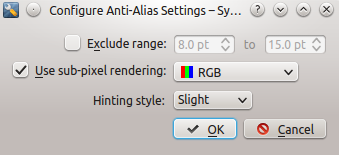
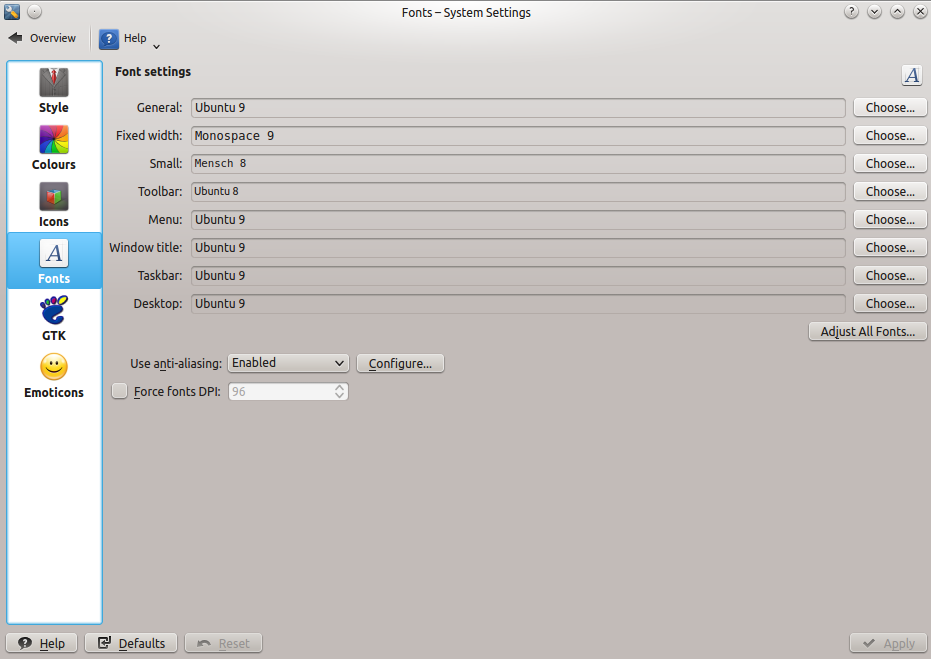
<p>KDE supports font antialiasing natively and it is easy to setup by using the System Settings GUI.
<img class="center" src="http://www.procmind.com/images/posts/font-anti-aliasing-kde4x-01.png" title="'font settings'" >
<img class="center" src="http://www.procmind.com/images/posts/font-anti-aliasing-kde4x-02.png" title="'anti-aliasing font settings'" ></p>

<h3>Touchpad</h3>

<h4>Normal mode scrolling</h4>

<p>This is the normal mode of scrolling, meaning different than what the apple marketing machinery has named <em>natural scrolling</em> which is reverse scrolling.</p>

<p>KDE&rsquo;s system settings comes by default with normal scrolling or if you really prefer it you can have reverse scrolling, just change the touchpad settings.</p>

<h4>Multitouch</h4>

<p>By default the only multitouch gesture supported out of the box by a KDE 4.x installation is two finger scrolling. Set it up in the System Settings GUI and you&rsquo;re done.</p>

<p>If you want to enable ala OSx multitouch in linux, here is another person that has solved that problem. [9]</p>

<h1>Laptop functions that work</h1>

<h3>Sleep</h3>

<p>Putting the laptop to sleep and waking up the laptop works flawlesly almost 100% of times.</p>

<p>Sleeping is a little slow , after you close the lid it takes 30s until the laptop actually goes to sleep. Waking up is also not instantaneous, it takes 3-5s to wake up.</p>

<p><em>For comparison purposes: sleep and wakeup is literally instantaneous on a thinkpad, tested on a a much older thinkpad with an i3 processor and on another newer than the macbook, with an i5 processor</em></p>

<p>One glitch with sleep/wakeup cycles is that very rarely, the laptop refuses to go to sleep when you close the lid. After a reboot the laptop starts behaving normally again with regards to the sleeping functionality. I&rsquo;ve seen this happen to my colleagues running OSx, although less often. The fact that this buggy behaviour is present on OSx and with the ubuntu package upgrade cycle ( some of which require a reboot anyway ) this glitch is not that annoying or noticeable.</p>

<h3>Battery life</h3>

<p>The battery life is not as good as it is on OSx, I can get ~70% of the battery life that you get on OSx.</p>

<p>Battery life for me is between 4 to 5 hours depending on the workload, where on OSx my colleagues can get a battery life of 7 hours maximum.</p>

<p>There are many microcontrollers/microchips on the macbook pro motherboard that the linux kernel doesn&rsquo;t know how to put into sleep mode since it is missing the drivers to talk to them. Missing drivers for the mainboard microcontrollers is showed by the fact that if I sleep the laptop over the weekend when I come back and wake it up the battery is low as if <em>something</em> was draining the battery in sleep mode.</p>

<p>If drivers would exist then I&rsquo;m sure battery life would be in the range of 95-99% of the battery life in OSx, there isn&rsquo;t anything magic about battery life but using the right drivers and using applications that are not battery hogs.</p>

<h4>TLP settings</h4>

<p>In linux I&rsquo;ve used tlp to manage battery power settings.</p>

<figure class='code'><figcaption><span>/etc/default/tlp </span></figcaption>
<div class="highlight"><table><tr><td class="gutter"><pre class="line-numbers"><span class='line-number'>1</span>
<span class='line-number'>2</span>
<span class='line-number'>3</span>
<span class='line-number'>4</span>
<span class='line-number'>5</span>
<span class='line-number'>6</span>
<span class='line-number'>7</span>
<span class='line-number'>8</span>
<span class='line-number'>9</span>
<span class='line-number'>10</span>
<span class='line-number'>11</span>
<span class='line-number'>12</span>
<span class='line-number'>13</span>
<span class='line-number'>14</span>
<span class='line-number'>15</span>
<span class='line-number'>16</span>
<span class='line-number'>17</span>
<span class='line-number'>18</span>
<span class='line-number'>19</span>
<span class='line-number'>20</span>
<span class='line-number'>21</span>
<span class='line-number'>22</span>
<span class='line-number'>23</span>
<span class='line-number'>24</span>
<span class='line-number'>25</span>
<span class='line-number'>26</span>
<span class='line-number'>27</span>
<span class='line-number'>28</span>
<span class='line-number'>29</span>
<span class='line-number'>30</span>
<span class='line-number'>31</span>
<span class='line-number'>32</span>
<span class='line-number'>33</span>
<span class='line-number'>34</span>
<span class='line-number'>35</span>
<span class='line-number'>36</span>
<span class='line-number'>37</span>
<span class='line-number'>38</span>
<span class='line-number'>39</span>
</pre></td><td class='code'><pre><code class='sh'><span class='line'><span class="nv">TLP_ENABLE</span><span class="o">=</span>1
</span><span class='line'><span class="nv">DISK_IDLE_SECS_ON_AC</span><span class="o">=</span>0
</span><span class='line'><span class="nv">DISK_IDLE_SECS_ON_BAT</span><span class="o">=</span>2
</span><span class='line'><span class="nv">MAX_LOST_WORK_SECS_ON_AC</span><span class="o">=</span>15
</span><span class='line'><span class="nv">MAX_LOST_WORK_SECS_ON_BAT</span><span class="o">=</span>60
</span><span class='line'><span class="nv">CPU_SCALING_GOVERNOR_ON_AC</span><span class="o">=</span>ondemand
</span><span class='line'><span class="nv">CPU_SCALING_GOVERNOR_ON_BAT</span><span class="o">=</span>powersave
</span><span class='line'><span class="nv">CPU_BOOST_ON_AC</span><span class="o">=</span>1
</span><span class='line'><span class="nv">CPU_BOOST_ON_BAT</span><span class="o">=</span>0
</span><span class='line'><span class="nv">SCHED_POWERSAVE_ON_AC</span><span class="o">=</span>0
</span><span class='line'><span class="nv">SCHED_POWERSAVE_ON_BAT</span><span class="o">=</span>1
</span><span class='line'><span class="nv">NMI_WATCHDOG</span><span class="o">=</span>0
</span><span class='line'><span class="nv">DISK_DEVICES</span><span class="o">=</span><span class="s2">&quot;sda sdb&quot;</span>
</span><span class='line'><span class="nv">DISK_APM_LEVEL_ON_AC</span><span class="o">=</span><span class="s2">&quot;254 254&quot;</span>
</span><span class='line'><span class="nv">DISK_APM_LEVEL_ON_BAT</span><span class="o">=</span><span class="s2">&quot;128 128&quot;</span>
</span><span class='line'><span class="nv">SATA_LINKPWR_ON_AC</span><span class="o">=</span>max_performance
</span><span class='line'><span class="nv">SATA_LINKPWR_ON_BAT</span><span class="o">=</span>medium_power
</span><span class='line'><span class="nv">PCIE_ASPM_ON_AC</span><span class="o">=</span>performance
</span><span class='line'><span class="nv">PCIE_ASPM_ON_BAT</span><span class="o">=</span>powersave
</span><span class='line'><span class="nv">RADEON_POWER_PROFILE_ON_AC</span><span class="o">=</span>high
</span><span class='line'><span class="nv">RADEON_POWER_PROFILE_ON_BAT</span><span class="o">=</span>low
</span><span class='line'><span class="nv">RADEON_DPM_STATE_ON_AC</span><span class="o">=</span>performance
</span><span class='line'><span class="nv">RADEON_DPM_STATE_ON_BAT</span><span class="o">=</span>battery
</span><span class='line'><span class="nv">RADEON_DPM_PERF_LEVEL_ON_AC</span><span class="o">=</span>auto
</span><span class='line'><span class="nv">RADEON_DPM_PERF_LEVEL_ON_BAT</span><span class="o">=</span>auto
</span><span class='line'><span class="nv">WIFI_PWR_ON_AC</span><span class="o">=</span>1
</span><span class='line'><span class="nv">WIFI_PWR_ON_BAT</span><span class="o">=</span>5
</span><span class='line'><span class="nv">WOL_DISABLE</span><span class="o">=</span>Y
</span><span class='line'><span class="nv">SOUND_POWER_SAVE_ON_AC</span><span class="o">=</span>0
</span><span class='line'><span class="nv">SOUND_POWER_SAVE_ON_BAT</span><span class="o">=</span>1
</span><span class='line'><span class="nv">SOUND_POWER_SAVE_CONTROLLER</span><span class="o">=</span>Y
</span><span class='line'><span class="nv">BAY_POWEROFF_ON_BAT</span><span class="o">=</span>0
</span><span class='line'><span class="nv">BAY_DEVICE</span><span class="o">=</span><span class="s2">&quot;sr0&quot;</span>
</span><span class='line'><span class="nv">RUNTIME_PM_ON_AC</span><span class="o">=</span>auto
</span><span class='line'><span class="nv">RUNTIME_PM_ON_BAT</span><span class="o">=</span>auto
</span><span class='line'><span class="nv">RUNTIME_PM_ALL</span><span class="o">=</span>0
</span><span class='line'><span class="nv">USB_AUTOSUSPEND</span><span class="o">=</span>1
</span><span class='line'><span class="nv">USB_BLACKLIST_WWAN</span><span class="o">=</span>1
</span><span class='line'><span class="nv">RESTORE_DEVICE_STATE_ON_STARTUP</span><span class="o">=</span>0
</span></code></pre></td></tr></table></div></figure>


<h3>External multiple monitors</h3>

<p>The macbook pro has 2 thunderbolt/mini-DVI video outputs on the left and 1 HDMI video output on the right side.</p>

<p>The video output combinations that I&rsquo;ve tried and work are:</p>

<ul>
<li>2 external monitors via the thunderbolt/mini-DVI video output and the laptop panel.</li>
<li>1 external monitor via one of the thunderbolt/mini-DVI video output and the laptop panel.</li>
<li>1 external monitor or external smart-tv via the HDMI video output and the laptop panel.</li>
</ul>


<p>All three described setups works in a plug-and-play fashion with the nvidia driver installed.</p>

<p>The single glitch with external single/multiple monitors is the fact that the laptop panel must set to the maximum resolution, 2880x1800.</p>

<p>See the video showcase for how external monitors work with Ubuntu on the macbook pro retina.</p>

<h3>USB to Ethernet adapter</h3>

<p>The USB to Ethernet adapter works flawlesly without any intervention. Just plug it and use it.</p>

<h1>Laptop functions that don&rsquo;t work and glitches</h1>

<h3>webcam</h3>

<p>The iSight webcam that comes with this version of the macbook pro retina doesn&rsquo;t work at all under linux.</p>

<p>There are various bugs on launchpad against Ubuntu, and on bugzilla.kernel.org against the linux kernel to get the iSight camera to work. [7] [8]</p>

<p>If anyone has got the iSight camera working let me know.</p>

<h3>USB glitch</h3>

<p>Extremely rarely the USB on the right side, next to the HDMI cable, throws this weird stacktrace and refuses to continue working.</p>

<p>The USB refuses to work after wakeup from sleep mode, throwing this error message in syslog.
I have to reboot as a workaround for this glitch.</p>

<figure class='code'><div class="highlight"><table><tr><td class="gutter"><pre class="line-numbers"><span class='line-number'>1</span>
<span class='line-number'>2</span>
<span class='line-number'>3</span>
<span class='line-number'>4</span>
<span class='line-number'>5</span>
<span class='line-number'>6</span>
<span class='line-number'>7</span>
<span class='line-number'>8</span>
<span class='line-number'>9</span>
<span class='line-number'>10</span>
<span class='line-number'>11</span>
<span class='line-number'>12</span>
</pre></td><td class='code'><pre><code class='sh'><span class='line'>...
</span><span class='line'>Freezing of tasks failed after 20.007 seconds <span class="o">(</span><span class="m">1</span> tasks refusing to freeze, <span class="nv">wq_busy</span><span class="o">=</span>0<span class="o">)</span>:
</span><span class='line'>Jan <span class="m">20</span> 19:46:42 &lt;edited&gt; kernel: <span class="o">[</span>57081.365212<span class="o">]</span> khubd           D <span class="m">0000000000000001</span>     <span class="m">0</span>    <span class="m">74</span>      <span class="m">2</span> 0x00000000
</span><span class='line'>Jan <span class="m">20</span> 19:46:42 &lt;edited&gt; kernel: <span class="o">[</span>57081.365215<span class="o">]</span>  ffff88046442f918 <span class="m">0000000000000046</span> <span class="m">0000000000000086</span> ffff88046442ffd8
</span><span class='line'>Jan <span class="m">20</span> 19:46:42 &lt;edited&gt; kernel: <span class="o">[</span>57081.365217<span class="o">]</span>  <span class="m">0000000000014400</span> <span class="m">0000000000014400</span> ffff8804653a1440 ffff880464430000
</span><span class='line'>Jan <span class="m">20</span> 19:46:42 &lt;edited&gt; kernel: <span class="o">[</span>57081.365218<span class="o">]</span>  <span class="m">0000000000000006</span> ffff88046442f950 0000000100d8b955 ffff880464e40000
</span><span class='line'>Jan <span class="m">20</span> 19:46:42 &lt;edited&gt; kernel: <span class="o">[</span>57081.365220<span class="o">]</span> Call Trace:
</span><span class='line'>Jan <span class="m">20</span> 19:46:42 &lt;edited&gt; kernel: <span class="o">[</span>57081.365226<span class="o">]</span>  <span class="o">[</span>&lt;ffffffff82790129&gt;<span class="o">]</span> schedule+0x29/0x70
</span><span class='line'>Jan <span class="m">20</span> 19:46:42 &lt;edited&gt; kernel: <span class="o">[</span>57081.365227<span class="o">]</span>  <span class="o">[</span>&lt;ffffffff8278f4ac&gt;<span class="o">]</span> schedule_timeout+0x11c/0x210
</span><span class='line'>...
</span><span class='line'>Restarting kernel threads ... <span class="k">done</span>.
</span><span class='line'>Jan <span class="m">20</span> 19:46:42 &lt;edited&gt; kernel: <span class="o">[</span>57081.365453<span class="o">]</span> Restarting tasks ... <span class="k">done</span>.
</span></code></pre></td></tr></table></div></figure>


<p>Since it happens extremely rarely this USB glitch is hardly noticeable, I have to reboot on a fairly regular basis for package updates anyway.</p>

<h3>kded4/kdeinit4 crashes sometimes</h3>

<p>Sometimes, when plugging and unplugging multiple monitors, many times in a day the <code>kded4 / kdeinit4</code> daemon crashes.</p>

<p>The icons change in the system notification area when <code>kded4</code> crashes and the external monitor doesn&rsquo;t output anything when <code>kded4</code> crashes. You can&rsquo;t miss it :)</p>

<p>The workaround is very very simple for this bug, open a terminal and type ( as your user, sudo/root is not needed )</p>

<figure class='code'><div class="highlight"><table><tr><td class="gutter"><pre class="line-numbers"><span class='line-number'>1</span>
</pre></td><td class='code'><pre><code class='sh'><span class='line'>kded4 <span class="p">&amp;</span>
</span></code></pre></td></tr></table></div></figure>


<p>After typing this the icons change to their normal look and the video output starts outputting on the external monitor.</p>

<h1>Other fixes and hacks that I employ</h1>

<h2>Scripted resolution scaling</h2>

<p>Using a macbook pro retina with external monitors requires that I scale the resolution, to maximum, when plugging in the external monitors, and to 1920x1080 when using it the laptop by itself.</p>

<p>To achieve this fast scaling without opening the nvidia driver UI or the KDE display configuration UI I&rsquo;ve found and altered a shell script to quickly change resolution by using xrandr. [13]</p>

<figure class='code'><div class="highlight"><table><tr><td class="gutter"><pre class="line-numbers"><span class='line-number'>1</span>
<span class='line-number'>2</span>
<span class='line-number'>3</span>
<span class='line-number'>4</span>
<span class='line-number'>5</span>
<span class='line-number'>6</span>
<span class='line-number'>7</span>
</pre></td><td class='code'><pre><code class='sh'><span class='line'>to switch to the maximum resolution
</span><span class='line'>...
</span><span class='line'>~/bin/macbook_pro_screen_resolution.sh 2880
</span><span class='line'>
</span><span class='line'>to switch to the scaled <span class="m">1920</span> resolution useable when using the laptop without external monitors
</span><span class='line'>
</span><span class='line'>~/bin/macbook_pro_screen_resolution.sh 1920
</span></code></pre></td></tr></table></div></figure>


<h2>kworker hogging cpu</h2>

<p>This issue <strong>is not caused by running linux on a macbook pro</strong>, it is related to the combination of ubuntu linux distro and kernel version. The same issue has happened to other people on different hardware.</p>

<p>This hasn&rsquo;t happen in a long long time, but since I have some notes I&rsquo;ll add it in this blog post for posterity.</p>

<p>In the beginnings, after the install in 2014, there were times when, sometimes, one kworker thread would hog a CPUs continuously.</p>

<p>To fix it you must find the kworker thread and disable it.</p>

<figure class='code'><figcaption><span></span></figcaption><div class="highlight"><table><tr><td class="gutter"><pre class="line-numbers"><span class='line-number'>1</span>
<span class='line-number'>2</span>
</pre></td><td class='code'><pre><code class='bash'><span class='line'>grep enabled /sys/firmware/acpi/interrupts/*
</span><span class='line'><span class="nb">echo</span> <span class="s2">&quot;disable&quot;</span> &gt; /sys/firmware/acpi/interrupts/gpeXX
</span></code></pre></td></tr></table></div></figure>


<p>Follow these links to detailed articles on what and why kworker is hogging a cpu [10] [11] [12]</p>

<h2>Touchpad / trackpad settings</h2>

<p>To decrease the sensitivity of the trackpad in KDE, I&rsquo;ve used some of the trackpad settings from unity.</p>

<p>To have the keyboard settings activate on KDE login I&rsquo;ve created a <code>~/.xinitrc</code> file with this content:</p>

<figure class='code'><figcaption><span>.xinitrc </span></figcaption>
<div class="highlight"><table><tr><td class="gutter"><pre class="line-numbers"><span class='line-number'>1</span>
<span class='line-number'>2</span>
<span class='line-number'>3</span>
<span class='line-number'>4</span>
<span class='line-number'>5</span>
<span class='line-number'>6</span>
<span class='line-number'>7</span>
<span class='line-number'>8</span>
<span class='line-number'>9</span>
<span class='line-number'>10</span>
<span class='line-number'>11</span>
<span class='line-number'>12</span>
<span class='line-number'>13</span>
</pre></td><td class='code'><pre><code class='sh'><span class='line'><span class="c">#!/bin/bash</span>
</span><span class='line'>
</span><span class='line'>synclient <span class="nv">MaxTapMove</span><span class="o">=</span>535
</span><span class='line'>synclient <span class="nv">VertScrollDelta</span><span class="o">=</span>243
</span><span class='line'>synclient <span class="nv">HorizScrollDelta</span><span class="o">=</span>243
</span><span class='line'>synclient <span class="nv">VertEdgeScroll</span><span class="o">=</span>0
</span><span class='line'>synclient <span class="nv">HorizEdgeScroll</span><span class="o">=</span>0
</span><span class='line'>synclient <span class="nv">MinSpeed</span><span class="o">=</span>1
</span><span class='line'>synclient <span class="nv">MaxSpeed</span><span class="o">=</span>1.75
</span><span class='line'>synclient <span class="nv">AccelFactor</span><span class="o">=</span>0.0164447
</span><span class='line'>synclient <span class="nv">TouchpadOff</span><span class="o">=</span>0
</span><span class='line'>synclient <span class="nv">RTCornerButton</span><span class="o">=</span>2
</span><span class='line'>synclient <span class="nv">CircScrollDelta</span><span class="o">=</span>0.1
</span></code></pre></td></tr></table></div></figure>


<h1>Video showcase</h1>

<p>Stay tuned for part 2 of this blog post where I will have some youtube videos of how the laptop works with linux on it.</p>

<h1>Comments</h1>

<p>If you have any comments please use twitter DM, I&rsquo;ve not enabled any comments on this blog yet.</p>

<h1>Resources and inspiration</h1>

<p>[1] - <a href="http://www.rodsbooks.com/refind/installing.html">http://www.rodsbooks.com/refind/installing.html</a></p>

<p>[2] - <a href="http://glandium.org/blog/?p=2830">http://glandium.org/blog/?p=2830</a></p>

<p>[3] - <a href="https://wiki.ubuntu.com/Ubiquity">https://wiki.ubuntu.com/Ubiquity</a></p>

<p>[4] - <a href="https://blog.jessfraz.com/post/linux-on-mac/">https://blog.jessfraz.com/post/linux-on-mac/</a></p>

<p>[5] - <a href="http://www.everymac.com/systems/apple/macbook_pro/macbook-pro-retina-display-faq/macbook-pro-retina-display-how-to-manually-switch-graphics.html">http://www.everymac.com/systems/apple/macbook_pro/macbook-pro-retina-display-faq/macbook-pro-retina-display-how-to-manually-switch-graphics.html</a></p>

<p>[6] - <a href="http://www.everymac.com/systems/apple/macbook_pro/macbook-pro-retina-display-faq/macbook-pro-retina-display-how-to-manually-switch-graphics.html#extdisplays">http://www.everymac.com/systems/apple/macbook_pro/macbook-pro-retina-display-faq/macbook-pro-retina-display-how-to-manually-switch-graphics.html#extdisplays</a></p>

<p>[7] - <a href="https://bugs.launchpad.net/ubuntu/+source/linux/+bug/1287984">https://bugs.launchpad.net/ubuntu/+source/linux/+bug/1287984</a></p>

<p>[8] - <a href="https://bugzilla.kernel.org/show_bug.cgi?id=71131">https://bugzilla.kernel.org/show_bug.cgi?id=71131</a></p>

<p>[9] - <a href="https://medium.com/@PhilPlckthun/ubuntu-14-10-running-on-my-macbook-18991a697ae0">https://medium.com/@PhilPlckthun/ubuntu-14-10-running-on-my-macbook-18991a697ae0</a></p>

<p>[10] - <a href="http://capocasa.net/crushing-the-kworker-uprising-or-how-to-fix-your-linux-lenovo-ideapad-y560p">http://capocasa.net/crushing-the-kworker-uprising-or-how-to-fix-your-linux-lenovo-ideapad-y560p</a></p>

<p>[11] - <a href="https://bugs.launchpad.net/ubuntu/+source/linux/+bug/1087010">https://bugs.launchpad.net/ubuntu/+source/linux/+bug/1087010</a></p>

<p>[12] - <a href="http://askubuntu.com/questions/33640/kworker-what-is-it-and-why-is-it-hogging-so-much-cpu">http://askubuntu.com/questions/33640/kworker-what-is-it-and-why-is-it-hogging-so-much-cpu</a></p>

<p>[13] - <a href="https://gist.github.com/stefancocora/476bcaa51115cb28b174">https://gist.github.com/stefancocora/476bcaa51115cb28b174</a></p>

<p>[14] - <a href="https://support.apple.com/kb/SP690?locale=en_GB">https://support.apple.com/kb/SP690?locale=en_GB</a></p>

<p>[15] - <a href="https://help.ubuntu.com/community/MacBookPro11-3">https://help.ubuntu.com/community/MacBookPro11-3</a></p>

<p>[16] - <a href="http://ark.intel.com/products/76086/Intel-Core-i7-4850HQ-Processor-6M-Cache-up-to-3_50-GHz">http://ark.intel.com/products/76086/Intel-Core-i7-4850HQ-Processor-6M-Cache-up-to-3_50-GHz</a></p>

<p>[17] - <a href="https://unix.stackexchange.com/questions/148356/how-to-know-if-im-booting-using-uefi">https://unix.stackexchange.com/questions/148356/how-to-know-if-im-booting-using-uefi</a></p>
]]></content>
  </entry>
  
  <entry>
    <title type="html"><![CDATA[X2go and Ssh Ecdsa Keys]]></title>
    <link href="http://www.procmind.com/blog/2015/11/21/x2go-and-ssh-ecdsa-keys/"/>
    <updated>2015-11-21T21:53:15+00:00</updated>
    <id>http://www.procmind.com/blog/2015/11/21/x2go-and-ssh-ecdsa-keys</id>
    <content type="html"><![CDATA[<p>reading time: ~7m</p>

<p>Is <code>x2goclient</code> continuously asking you for <strong>enter passphrase to decrypt a key</strong> even when you absolutely know you&rsquo;ve typed it correctly, or you already know the ssh key is handled by your ssh agent ?</p>

<p>Have you verified that your ssh key based login is working, via a terminal shell already ?</p>

<p>If yes, than read further to understand all about why <code>x2goclient</code> behaves that way and why I think this is a new bug in <code>x2goclient</code>.</p>

<!-- more -->


<hr />

<p>First though, a short intro to x2go.</p>

<h1>What is x2go ?</h1>

<p>X2go is a <strong>remote desktop solution</strong> of sorts, it allows one to access a graphical desktop of a computer over a <em>low bandwidth</em> (or high bandwidth) connection <a href="http://wiki.x2go.org/doku.php/doc:deployment-stories:start">http://wiki.x2go.org/doku.php/doc:deployment-stories:start</a> [1]</p>

<p>X2go <strong>works in a server client architecture</strong>, with <em>x2go server</em> being installed on the systems to be accessed, and <em>x2goclient</em> being installed on the systems accessing the <em>x2go server</em> ( typically the x2goclients would be your workstations and laptops connecting to a shared/central x2go server )</p>

<p>X2go operates and competes in the same space as microsoft remote desktop, although uses a <strong>different wire transfer protocol tunneled through an OpenSSH encrypted connection</strong> ( see [1] ).</p>

<p>X2go can tunnel through the OpenSSH connection anything from the GUI on the server side, to sound and file transfers.</p>

<p>X2go is mostly meant to access Linux <strong>servers</strong> from <strong>clients</strong> running different OSes (Linux/Mac/Windows).</p>

<h1>How does x2go help me ?</h1>

<p>I have at home a very powerful desktop with plently of RAM and CPU cycles.</p>

<p>I run different kinds of headless virtualisation workloads on it ( mainly kvm and sometimes virtualbox ).</p>

<p>That being said I want to use the RAM and CPU cycles for the virtualisation workloads and not to run an Xorg GUI and a Desktop Environment.</p>

<p>Sometimes, the tools that work with virtualisation, have to be run with a GUI that the virtualisation provider provides, for debugging purposes ( think the virtualbox GUI or qemu/kvm GUI ).</p>

<p>Since I work through the terminal and via OpenSSH all the time, I naturally looked for a way of not having to run an entire Desktop Environment on my desktop all the time. I wanted to have the choice and flexibility of when to use a DE and when to not use a DE.</p>

<p>X2go allows me to spawn an entire KDE session when I use the <code>x2goclient</code> tool, run the necessary GUI debugging tools, then disconnect without needing to worry about turning off the DE on my headless desktop system. It is a handsoff way of running a DE only when you need to.</p>

<p>Now you&rsquo;ll see 2 screenshots, capturing an x2go session, showing that there is no Xorg running, and that x2go starts a kde session.</p>

<p><img class="center" src="http://www.procmind.com/images/posts/x2goclient-session-kde.png" title="'No Xorg running'" ></p>

<p><img class="center" src="http://www.procmind.com/images/posts/x2goclient-session-kde-02.png" title="'KDE is started by x2go'" ></p>

<h1>The x2go bug</h1>

<p>What is this x2go bug that I&rsquo;m talking about ?</p>

<p>As it happens, <strong>x2go cannot use a private OpenSSH key of the ECDSA type using bcrypt as the passphrase hashing algorithm</strong> [2] [3]</p>

<p>I&rsquo;ve tested this behaviour with both x2goclient nightly <code>4.0.5.1-0~1107~ubuntu14.04.1</code> and x2goclient stable <code>4.0.5.0-0~1099~ubuntu14.04.1</code> from a laptop running Ubuntu 14.04 amd64.</p>

<p>If I try to use the x2goclient with the ECDSA(bcrypt) type of ssh key I continuously get prompted to enter a passphrase to decrypt the key, even after typing the passphrase successfully x2go will continue the loop of asking for a passphrase. (see this screenshot)</p>

<p><img class="center" src="http://www.procmind.com/images/posts/x2goclient-session-kde-04.png" title="'Enter passphrase to decrypt a key'" ></p>

<h1>The solution</h1>

<p>The solution to this issue is very simple, once you&rsquo;ve understood the problem :)</p>

<ul>
<li>Generate a second ssh keypair using RSA keys [4]</li>
</ul>


<figure class='code'><div class="highlight"><table><tr><td class="gutter"><pre class="line-numbers"><span class='line-number'>1</span>
<span class='line-number'>2</span>
<span class='line-number'>3</span>
</pre></td><td class='code'><pre><code class='sh'><span class='line'>ssh-keygen -trsa -b4096
</span><span class='line'>Generating public/private rsa key pair.
</span><span class='line'>...
</span></code></pre></td></tr></table></div></figure>


<ul>
<li>place the ssh public key on the x2go server</li>
<li>test connectivity via a terminal ssh session</li>
<li>instruct x2goclient to use the rsa key to connect</li>
</ul>


<p>How do I know the difference between and ECDSA(with bcrypt) new style key and an old style RSA key I hear you ask ?</p>

<p>As it turns out the header of the ssh private key will tell you.</p>

<figure class='code'><figcaption><span>ECDSA with bcrypt new style key </span></figcaption>
<div class="highlight"><table><tr><td class="gutter"><pre class="line-numbers"><span class='line-number'>1</span>
<span class='line-number'>2</span>
</pre></td><td class='code'><pre><code class='sh'><span class='line'>-----BEGIN OPENSSH PRIVATE KEY-----
</span><span class='line'>base64 nonsense
</span></code></pre></td></tr></table></div></figure>


<figure class='code'><figcaption><span>old style RSA key </span></figcaption>
<div class="highlight"><table><tr><td class="gutter"><pre class="line-numbers"><span class='line-number'>1</span>
<span class='line-number'>2</span>
</pre></td><td class='code'><pre><code class='sh'><span class='line'>-----BEGIN RSA PRIVATE KEY-----
</span><span class='line'>base64 nonsense
</span></code></pre></td></tr></table></div></figure>


<h1>Comments</h1>

<p>If you have any comments please use twitter, I&rsquo;ve not enabled any comments on this blog yet.</p>

<h1>Resources and inspiration</h1>

<p>[1] - <a href="http://wiki.x2go.org/doku.php/doc:deployment-stories:start">http://wiki.x2go.org/doku.php/doc:deployment-stories:start</a></p>

<p>[2] - <a href="https://wiki.archlinux.org/index.php/SSH_keys#ECDSA">https://wiki.archlinux.org/index.php/SSH_keys#ECDSA</a></p>

<p>[3] - <a href="http://www.tedunangst.com/flak/post/new-openssh-key-format-and-bcrypt-pbkdf">http://www.tedunangst.com/flak/post/new-openssh-key-format-and-bcrypt-pbkdf</a></p>

<p>[4] - <a href="https://wiki.archlinux.org/index.php/SSH_keys#RSA">https://wiki.archlinux.org/index.php/SSH_keys#RSA</a></p>
]]></content>
  </entry>
  
  <entry>
    <title type="html"><![CDATA[Containerized Tweetdeck on Linux]]></title>
    <link href="http://www.procmind.com/blog/2015/04/19/tweetdeck-on-linux/"/>
    <updated>2015-04-19T15:43:57+01:00</updated>
    <id>http://www.procmind.com/blog/2015/04/19/tweetdeck-on-linux</id>
    <content type="html"><![CDATA[<p>Twitter [1] is one of these relatively &ldquo;recent&rdquo; proprietary platforms that make a few things a lot easier:</p>

<ul>
<li>sharing interesting articles</li>
<li>sharing links</li>
<li>sharing ideas - short ideas &lt;= 140 chars :)</li>
<li>ask someone from another country their feedback on something</li>
<li>you can give feedback, in almost real-time, to the maintainers of some piece of software you use</li>
<li>spam everybody with every single thing you do at every hour of the day ;)
&hellip;</li>
</ul>


<p>That being said, the status of the twitter <strong>desktop</strong> clients on Linux is close to unusable.</p>

<!-- more -->


<h1>Current status of twitter clients for linux</h1>

<ul>
<li>they are all broken or missing some functionality</li>
<li>they&rsquo;re not easily maintainable because of twitter API key limits, that is what I&rsquo;ve seen other people say in this <a href="https://www.reddit.com/r/linux/comments/2a0zf3/scarcity_of_linux_twitter_client/">reddit thread discussing the lack of linux clients</a> [2]</li>
</ul>


<p>I&rsquo;ve personally used for long periods of time ( months ), but was never satisfied with the quality of:</p>

<ul>
<li><a href="http://www.hotot.org/">hotot</a> which it has been discontinued , one of the best ones in my opinion</li>
<li><a href="http://choqok.gnufolks.org/">choqok</a> - specially made for KDE</li>
<li><a href="http://gwibber.com/">gwibber</a> - was integrated with ubuntu Unity when I used to use Unity</li>
</ul>


<h1>Why tweetdeck in wine in docker ?</h1>

<p>Get ready for inception++</p>

<h3>Docker</h3>

<p>Why build a twitter client in docker I hear you ask ?</p>

<p>Because <strong>it is easy for people to download it and test it</strong>.</p>

<p>If they like it, then <strong>the Dockerfile used to build the container, contains all the commands needed for anybody to replicate this build locally</strong>,
on their favourite distro so they can use it without Docker.</p>

<p>If there would be a way of automatically and programatically generating rpm/deb/tgz &hellip; packages in an automated fashion from a github repo I would probably do that too. I just don&rsquo;t know of a public service that can do that bit for multiple packaging formats.</p>

<p>For now a docker container allows for:</p>

<ul>
<li>the easiest distributable packaging system ( all distros use the same format - established by docker )</li>
<li>easily and automatically rebuilds when I change something in the source of the package - docker hub rebuilds the docker image for me</li>
</ul>


<h3>Tweetdeck</h3>

<p>Why use tweetdeck I hear you ask ?</p>

<p>Because it is the only twitter client that I&rsquo;ve found, maintained by twitter, which would mean that it evolves and grows togheter with the platform
 that it is built for.</p>

<h1>How does it work ?</h1>

<p>Tweetdeck is installed via wine, inside a docker container that also contains an openssh daemon and a full Xubuntu desktop.</p>

<p>The x2goclient software is used to spawn, on your laptop/desktop, over ssh the Xubuntu desktop running on the docker container.</p>

<p>This setup gives you:</p>

<ul>
<li>a windows binary

<ul>
<li>running inside wine on Xubuntu

<ul>
<li>running inside a docker container

<ul>
<li>a container running on your linux distro</li>
</ul>
</li>
</ul>
</li>
</ul>
</li>
</ul>


<p>I&rsquo;ve said it before, inception level 4 achieved !</p>

<p>The docker container has been shared on the docker hub - <a href="https://registry.hub.docker.com/u/stefancocora/tweetdeck-in-docker/">https://registry.hub.docker.com/u/stefancocora/tweetdeck-in-docker/</a> [4]</p>

<p>If you don&rsquo;t want to pull it from the docker hub then use this github page to clone the bits of software needed to build your own local image - <a href="https://github.com/stefancocora/tweetdeck-in-docker">tweetdeck-in-docker</a> [5]</p>

<h1>What do you need to be able to try it</h1>

<p>What will you need to try this out:</p>

<ul>
<li>You&rsquo;ll need a modern linux distro, with kernel 3.13 or newer(as per the docker requirements)</li>
</ul>


<figure class='code'><figcaption><span>Tested on my laptop - sh </span></figcaption>
<div class="highlight"><table><tr><td class="gutter"><pre class="line-numbers"><span class='line-number'>1</span>
<span class='line-number'>2</span>
<span class='line-number'>3</span>
<span class='line-number'>4</span>
<span class='line-number'>5</span>
<span class='line-number'>6</span>
<span class='line-number'>7</span>
<span class='line-number'>8</span>
<span class='line-number'>9</span>
</pre></td><td class='code'><pre><code class=''><span class='line'>§ uname -a
</span><span class='line'>Linux thoth 3.16.0-031600-generic #201408031935 SMP Sun Aug 3 23:36:11 UTC 2014 x86_64 x86_64 x86_64 GNU/Linux
</span><span class='line'>...
</span><span class='line'>§ lsb_release -a
</span><span class='line'>No LSB modules are available.
</span><span class='line'>Distributor ID: Ubuntu
</span><span class='line'>Description:    Ubuntu 14.04.2 LTS
</span><span class='line'>Release:        14.04
</span><span class='line'>Codename:       trusty</span></code></pre></td></tr></table></div></figure>


<ul>
<li>You&rsquo;ll need docker - I&rsquo;ve tested against docker 1.5.0 - here are the <a href="https://docs.docker.com/installation/#installation">docker install</a> docs if you&rsquo;re distro doesn&rsquo;t package the latest docker</li>
</ul>


<figure class='code'><figcaption><span></span></figcaption><div class="highlight"><table><tr><td class="gutter"><pre class="line-numbers"><span class='line-number'>1</span>
<span class='line-number'>2</span>
</pre></td><td class='code'><pre><code class='bash'><span class='line'>§ docker --version
</span><span class='line'>Docker version 1.5.0, build a8a31ef
</span></code></pre></td></tr></table></div></figure>


<ul>
<li>You&rsquo;ll need <a href="http://wiki.x2go.org/doku.php/doc:installation:x2goclient">x2goclient</a> [3]</li>
</ul>


<figure class='code'><figcaption><span></span></figcaption><div class="highlight"><table><tr><td class="gutter"><pre class="line-numbers"><span class='line-number'>1</span>
<span class='line-number'>2</span>
<span class='line-number'>3</span>
<span class='line-number'>4</span>
<span class='line-number'>5</span>
</pre></td><td class='code'><pre><code class='bash'><span class='line'>§ dpkg -l x2goclient
</span><span class='line'>...
</span><span class='line'><span class="o">||</span>/ Name                                                          Version                             Architecture                        Description
</span><span class='line'>+++-<span class="o">=============================================================</span>-<span class="o">===================================</span>-<span class="o">===================================</span>-<span class="o">========================================================</span>
</span><span class='line'>ii  x2goclient                                                    4.0.3.2-0~800~ubuntu14.04.1         amd64                               X2Go Client application <span class="o">(</span>Qt4<span class="o">)</span>
</span></code></pre></td></tr></table></div></figure>


<h3>Youtube video of these software bits working togheter</h3>

<p>I&rsquo;ve put togheter <a href="https://www.youtube.com/watch?v=O4TJmsnYhqQ">a video on youtube</a> [6] to guide you on how to use these pieces of software that I&rsquo;ve put togheter.</p>

<h1>How is tweetdeck working for me ?</h1>

<p>I&rsquo;ve used tweetdeck installed in wine(via playonlinux), without docker, on my day to day laptop since approximatively Dec 2014 when I&rsquo;ve first built this <strong>experiment</strong>.</p>

<p>I&rsquo;ve not had any major issues whatsoever, although I must say that I&rsquo;ve not looked at RAM consumption or any other issues like these since I have more than enough CPU and RAM resources on my laptop.</p>

<p>One small issue exists, although this small issue is the same even for full fledged browsers. I have to restart tweetdeck after I&rsquo;ve not restarted it for ~2 weeks and I&rsquo;ve put the laptop to sleep and woken it up repeatedly, this is a minor inconvenience.</p>

<h1>Issues</h1>

<p>Please report issues on the <a href="https://github.com/stefancocora/tweetdeck-in-docker">github repo</a></p>

<h1>Comments</h1>

<p>If you have any comments please use twitter, I&rsquo;ve not enabled any comments on this blog yet.</p>

<h1>Resources and inspiration</h1>

<p>[1] - <a href="https://en.wikipedia.org/wiki/Twitter">https://en.wikipedia.org/wiki/Twitter</a></p>

<p>[2] - <a href="https://www.reddit.com/r/linux/comments/2a0zf3/scarcity_of_linux_twitter_client/">https://www.reddit.com/r/linux/comments/2a0zf3/scarcity_of_linux_twitter_client/</a></p>

<p>[3] - <a href="http://wiki.x2go.org/doku.php/doc:installation:x2goclient">http://wiki.x2go.org/doku.php/doc:installation:x2goclient</a></p>

<p>[4] - <a href="https://registry.hub.docker.com/u/stefancocora/tweetdeck-in-docker/">https://registry.hub.docker.com/u/stefancocora/tweetdeck-in-docker/</a></p>

<p>[5] - <a href="https://github.com/stefancocora/tweetdeck-in-docker">https://github.com/stefancocora/tweetdeck-in-docker</a></p>

<p>[6] - youtube video - <a href="https://www.youtube.com/watch?v=O4TJmsnYhqQ">https://www.youtube.com/watch?v=O4TJmsnYhqQ</a></p>

<p>[7] - somebody else playing with docker and full X11 sessions <a href="https://github.com/paimpozhil/DockerX2go">https://github.com/paimpozhil/DockerX2go</a></p>

<p>[8] - another very interesting approach to running GUI apps in docker without x2go <a href="https://blog.jessfraz.com/posts/docker-containers-on-the-desktop.html">https://blog.jessfraz.com/posts/docker-containers-on-the-desktop.html</a></p>

<hr />
]]></content>
  </entry>
  
  <entry>
    <title type="html"><![CDATA[Hello World]]></title>
    <link href="http://www.procmind.com/blog/2015/02/21/hello-world/"/>
    <updated>2015-02-21T17:28:35+00:00</updated>
    <id>http://www.procmind.com/blog/2015/02/21/hello-world</id>
    <content type="html"><![CDATA[<h2>Hello World</h2>

<figure class='code'><figcaption><span>hello.rb </span></figcaption>
<div class="highlight"><table><tr><td class="gutter"><pre class="line-numbers"><span class='line-number'>1</span>
</pre></td><td class='code'><pre><code class='rb'><span class='line'><span class="nb">puts</span> <span class="s2">&quot;Hello World&quot;</span>
</span></code></pre></td></tr></table></div></figure>


<!-- more -->


<figure class='code'><figcaption><span>hello.py </span></figcaption>
<div class="highlight"><table><tr><td class="gutter"><pre class="line-numbers"><span class='line-number'>1</span>
</pre></td><td class='code'><pre><code class='py'><span class='line'><span class="k">print</span> <span class="s">&quot;Hello World&quot;</span>
</span></code></pre></td></tr></table></div></figure>


<figure class='code'><figcaption><span>hello.sh </span></figcaption>
<div class="highlight"><table><tr><td class="gutter"><pre class="line-numbers"><span class='line-number'>1</span>
</pre></td><td class='code'><pre><code class='sh'><span class='line'><span class="nb">echo</span> <span class="s2">&quot;Hello World&quot;</span>
</span></code></pre></td></tr></table></div></figure>


<figure class='code'><figcaption><span>hello.go </span></figcaption>
<div class="highlight"><table><tr><td class="gutter"><pre class="line-numbers"><span class='line-number'>1</span>
<span class='line-number'>2</span>
<span class='line-number'>3</span>
<span class='line-number'>4</span>
<span class='line-number'>5</span>
<span class='line-number'>6</span>
</pre></td><td class='code'><pre><code class='go'><span class='line'><span class="kn">package</span> <span class="nx">main</span>
</span><span class='line'><span class="kn">import</span> <span class="s">&quot;fmt&quot;</span>
</span><span class='line'>
</span><span class='line'><span class="kd">func</span> <span class="nx">main</span><span class="p">()</span> <span class="p">{</span>
</span><span class='line'>    <span class="nx">fmt</span><span class="p">.</span><span class="nx">Println</span><span class="p">(</span><span class="s">&quot;hello world&quot;</span><span class="p">)</span>
</span><span class='line'><span class="p">}</span>
</span></code></pre></td></tr></table></div></figure>


<p>This is all for now, come back later there will be aditional content.</p>

<hr />
]]></content>
  </entry>
  
</feed>